
Are you looking for the complete B2BKing review and tutorial? If you are, keep reading this article. Here is everything you need to know about the B2BKing plugin.
Managing wholesale customers in WooCommerce can quickly become complex without the right tools. Store owners often need features like tiered pricing, user roles, bulk ordering, and restricted access to create a proper B2B experience.
This is where B2BKing comes in. In this article, we will review and walk you through how to use B2BKing, one of the most feature-rich WooCommerce wholesale plugins available.
This guide is designed for store owners, agencies, and developers seeking a reliable way to build and manage a professional wholesale or B2B store using WordPress and WooCommerce.
Before going further, let’s see what a WooCommerce wholesale plugin is.
Table of Contents
What Is a WooCommerce Wholesale Plugin
A WooCommerce wholesale plugin is a tool that extends your standard WooCommerce store to support business-to-business sales.
While WooCommerce is designed mainly for retail customers, wholesale stores require additional features like bulk pricing, customer-specific discounts, and restricted access to products or pricing. With a wholesale plugin, you can create separate experiences for retail and wholesale buyers.
This includes setting tiered pricing, assigning user roles, offering bulk order forms, and controlling who can view certain products or prices. These features are essential for managing larger orders and long-term business clients.
In short, a WooCommerce wholesale plugin transforms a regular online store into a fully functional B2B platform tailored for wholesale operations.
What to Look for In WooCommerce Wholesale Plugin
Choosing the right wholesale plugin depends on the features that support efficient B2B operations and flexible pricing.
- Wholesale pricing and tiered discounts for different customer groups
- User roles and group-based access control
- Ability to hide prices or products for non-logged-in users
- Bulk order forms for faster purchasing
- Quote request system for custom pricing negotiations
- Tax and VAT handling for B2B transactions
- Flexible payment and shipping options based on user roles
- Easy integration with your existing WooCommerce setup
- Custom registration forms for wholesale customers
- Performance and scalability for handling large orders
In the next section, we will show you what B2BKing offers.
B2BKing: An Introduction
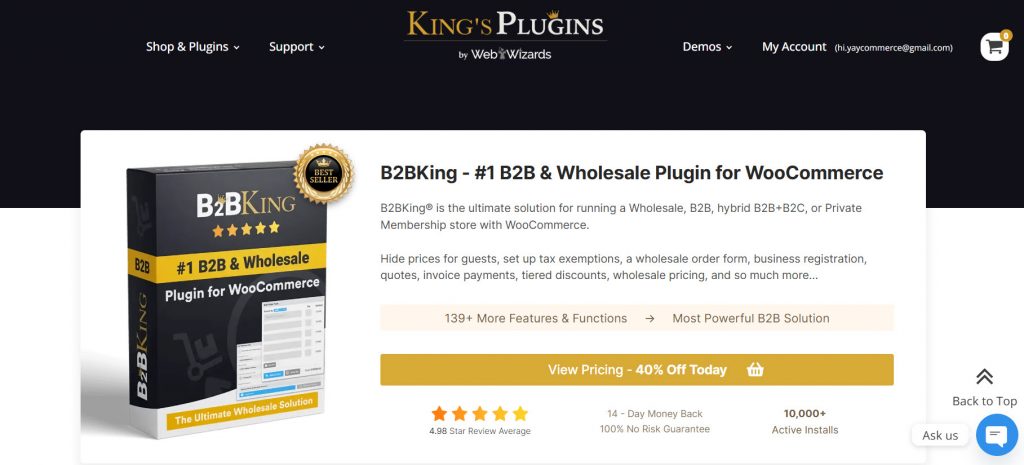
B2BKing is a comprehensive WooCommerce wholesale plugin designed to transform a standard online store into a fully functional B2B and wholesale platform.
It provides a wide range of tools to manage wholesale customers, control pricing, and customize the buying experience for different user groups.
With B2BKing, store owners can set up tiered pricing, create user roles, restrict product visibility, and enable features like quote requests and bulk ordering. It also includes advanced options for tax handling, payment methods, and customer-specific rules.
Overall, it is built to give businesses the flexibility and control needed to run a professional wholesale store directly within WooCommerce.
B2BKing Review + Tutorial: Everything You Need to Know
In this B2BKing review, we will show you everything about the
- Features
- Installation and Setup
- User Roles and Wholesale Customer Management
- Wholesale Pricing and Pricing Rules
- Product Visibility and Private Store Options
- Bulk Order Forms and Quick Ordering
- Quote Request System
- Payment and Shipping Control
- Tax and VAT Management
- Performance and Ease of Use
- Pricing
- Support and Docs
Let’s take a closer look at each option.
1. Features
B2BKing includes a range of advanced tools to streamline wholesale operations and improve store management.
- Custom user registration forms for wholesale customers
- Approval system for new B2B users
- Minimum order quantity and value rules
- Dynamic pricing rules based on conditions
- Multi-tier user groups for structured customer segmentation
- Messaging system between the store owner and customers
- Subaccounts for company teams and staff
- Purchase lists for repeat orders
- Offer and deal management for specific customers
- Integration with WooCommerce order and customer workflows
2. Installation and Setup
Getting started with B2BKing is straightforward, with slightly different steps depending on whether you are using the free or premium version.
The free version can be installed directly from the WordPress plugin repository. You can search for “B2BKing” in your WordPress dashboard, install it, and activate it like any other plugin. This is a quick way to explore the core features and basic functionality.
For the premium version, download the plugin file from the official website after completing your purchase. Once downloaded, you can upload it manually through the WordPress plugin upload option and activate it.
After activation, you can begin configuring the plugin settings to match your wholesale business needs.
3. User Roles and Wholesale Customer Management
B2BKing provides a robust system for managing wholesale customers through user roles and customer groups. It allows you to create dedicated B2B roles and assign users to specific groups, making it easy to separate wholesale buyers from regular retail customers.
You can control access, pricing, and store visibility based on these roles, ensuring each customer type gets a tailored experience.
The plugin also supports user approval workflows, allowing you to review and approve wholesale registrations before granting access. This structured approach helps businesses manage different customer segments efficiently while maintaining full control over how wholesale users interact with the store.
4. Wholesale Pricing and Pricing Rules
B2BKing offers a flexible pricing system that allows you to create and manage wholesale pricing rules based on different conditions.
You can set role-based pricing, apply discounts for specific customer groups, and define pricing rules that adjust based on quantity or purchase behavior. The plugin also supports dynamic pricing, allowing you to create advanced rules for individual users, groups, or products.
This makes it easier to offer personalized pricing for different wholesale clients without manually adjusting each order.
With these options, B2BKing gives you full control over how pricing is structured, helping you manage complex wholesale scenarios efficiently while maintaining consistency across your store.
5. Product Visibility
B2BKing gives you strong control over product visibility, allowing you to decide who can see specific products, categories, or pricing.
You can hide prices from guests, restrict certain products to wholesale users only, or create a fully private store where only logged-in customers can access content. This is especially useful for businesses that want to separate retail and wholesale experiences or offer exclusive products to specific customer groups. You can also control visibility by user role, ensuring each type of customer sees only what is relevant to them.
By managing product access this way, B2BKing helps you create a more targeted, professional wholesale environment while maintaining full control over your store.
6. Bulk Order Forms and Quick Ordering
B2BKing includes bulk order forms and quick-ordering features to streamline the purchasing process for wholesale customers.
Instead of browsing products one by one, users can view multiple items in a single interface and add them to the cart quickly by entering quantities. This setup is especially useful for businesses that regularly place large or repeat orders.
It reduces the time required to complete purchases and improves overall efficiency. Customers can search, filter, and order products in bulk without unnecessary steps.
By simplifying the ordering process, B2BKing creates a faster, more convenient experience for wholesale buyers, which can lead to higher order volume and better customer satisfaction.
7. Quote Request System
B2BKing includes a built-in quote request system that allows wholesale customers to request custom pricing instead of placing an order directly.
This is especially useful for businesses that handle large or negotiable orders where pricing may vary based on quantity, relationship, or specific requirements. Customers can submit a quote request from the frontend, and store owners can review, adjust pricing, and respond from the backend.
Once approved, the quote can be converted into an order, making the process smooth and efficient. This feature adds flexibility to your wholesale workflow and helps support negotiation-based sales, which are common in B2B transactions.
8. Payment and Shipping Control
B2BKing provides flexible control over payment and shipping methods by allowing store owners to tailor options based on user roles, customer groups, or specific conditions.
This means you can enable or disable certain payment gateways or shipping methods for wholesale customers, while keeping different options available for retail users.
For example, you can restrict cash-on-delivery for wholesale buyers, offer bank transfer options for B2B clients, or limit shipping methods by customer type or location. These controls help create a more customized checkout experience that aligns with your wholesale business requirements.
By managing payment and shipping at a granular level, B2BKing helps ensure that each customer sees only the options relevant to them, improving both efficiency and the overall user experience.
9. Tax and VAT Management
B2BKing includes built-in tools to handle tax and VAT requirements for wholesale transactions. It allows you to configure tax rules based on user roles, locations, and customer types, making it easier to manage B2B compliance.
You can also support tax-exempt customers by validating VAT numbers and automatically applying the correct tax settings. This is especially useful for businesses dealing with international clients or operating within regions that require VAT handling.
By automating these processes, B2BKing reduces manual work and ensures accurate tax calculations at checkout. Overall, it provides a flexible and reliable way to manage taxes in a wholesale WooCommerce store.
10. Performance and Ease of Use
B2BKing is designed to handle complex wholesale functionality while maintaining stable performance within WooCommerce.
It integrates directly into the existing WooCommerce system, so most features work within familiar workflows such as products, users, and orders. When configured properly, it performs well even with advanced pricing rules and multiple user roles.
In terms of ease of use, the plugin offers a wide range of settings, which can feel overwhelming at first. However, the interface is structured, and once you understand the core options, managing wholesale features becomes much easier.
With the help of its documentation and logical layout, users can gradually set up and control their wholesale store without needing deep technical knowledge.
11. Pricing
B2BKing is a freemium WordPress plugin. The lite version can be downloaded from the plugin’s repository, and all the basic features are available in the free plugin.
The premium version plugin will unlock every feature, and here is how much the subscription will cost you:
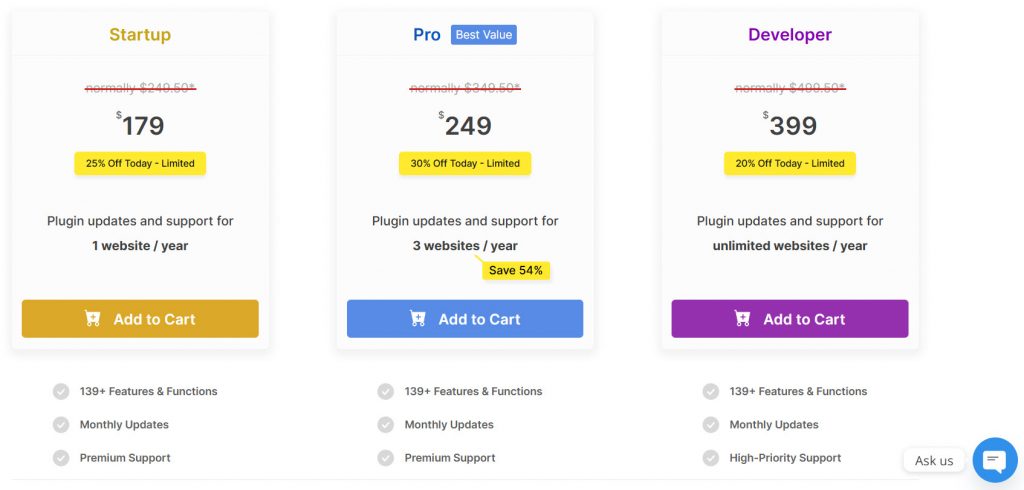
- Annual subscription
- Startup – $179 a year
- Pro – $249 a year
- Developer – $399 a year
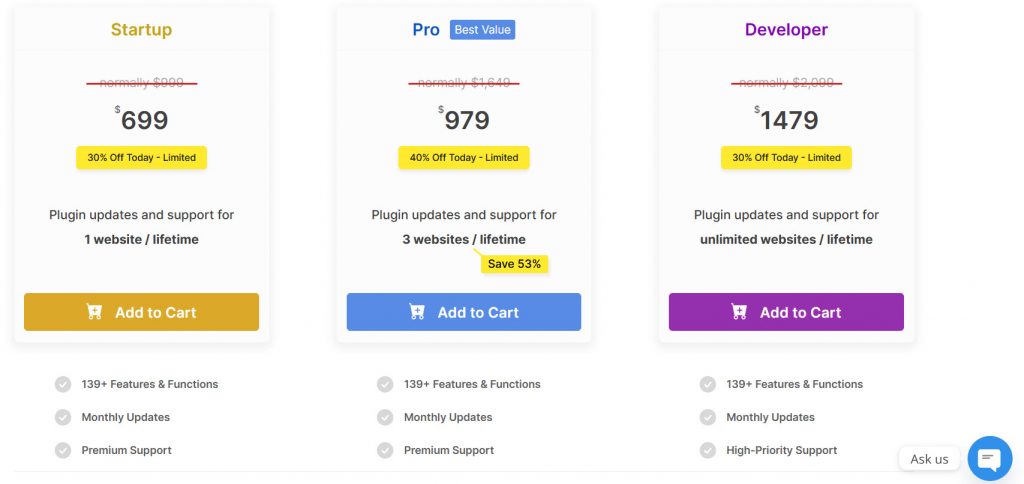
- Lifetime subscription
- Startup – $699 (one-time fee)
- Pro – $979 (one-time fee)
- Developer – $1479 (one-time fee)
You can pick an option based on your preferences.
12. Support and Docs
B2BKing provides solid documentation and support resources to help users get started and make the most of its features. The plugin includes detailed guides covering installation, setup, and advanced configurations, including pricing rules, user roles, and visibility settings.
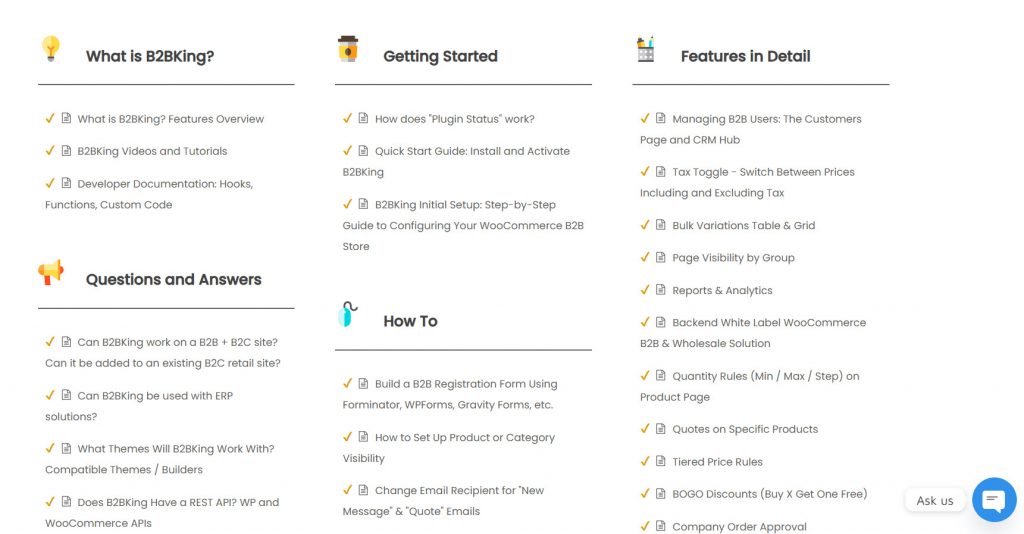
This makes it easier for both beginners and experienced users to understand how everything works. In addition to documentation, B2BKing offers dedicated support for technical issues and setup questions.
Users can access help when needed, which is especially useful given the plugin’s wide range of features. Overall, the combination of clear documentation and responsive support helps reduce the learning curve and ensures a smoother experience when building and managing a wholesale store.
How to Use B2BKing to Create a Wholesale Website
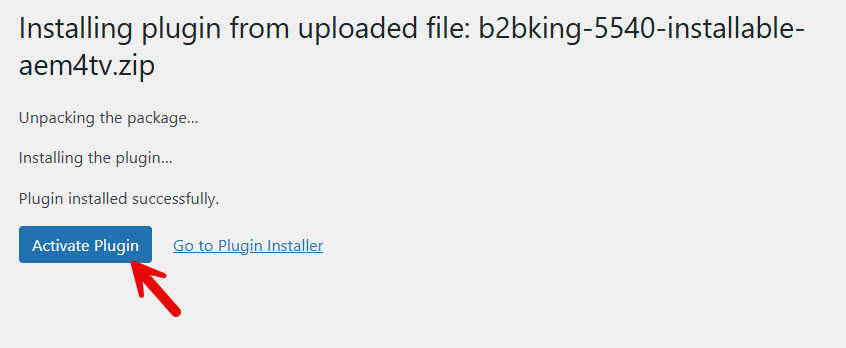
Once you have purchased the plugin, download the files from here.
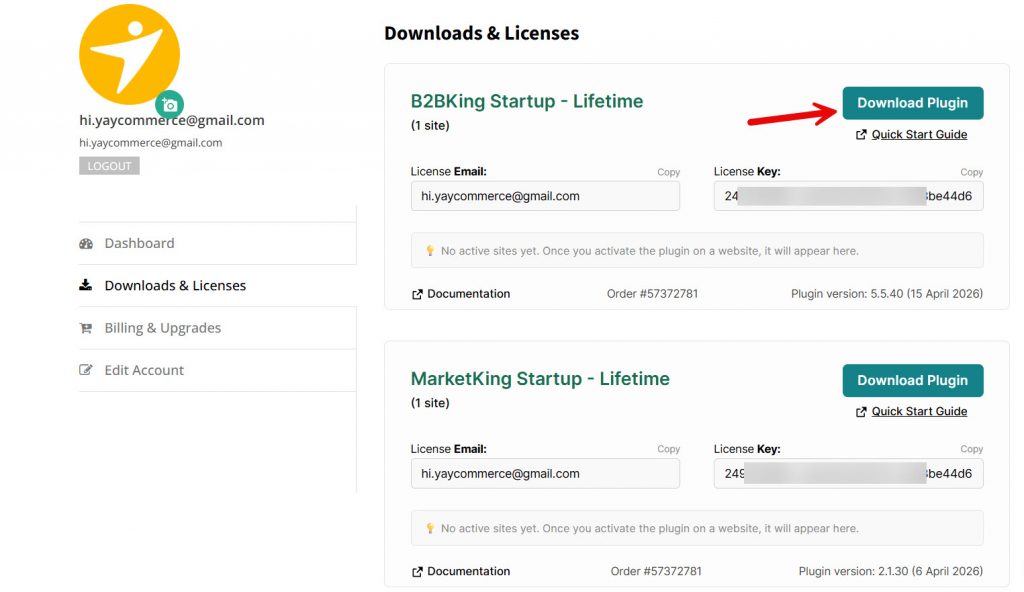
After downloading it, install and activate it on your website.
NOTE: You should also use the B2BKing Core plugin on your website for the wholesale plugin to work properly. It is free, and you can install it from the repository.
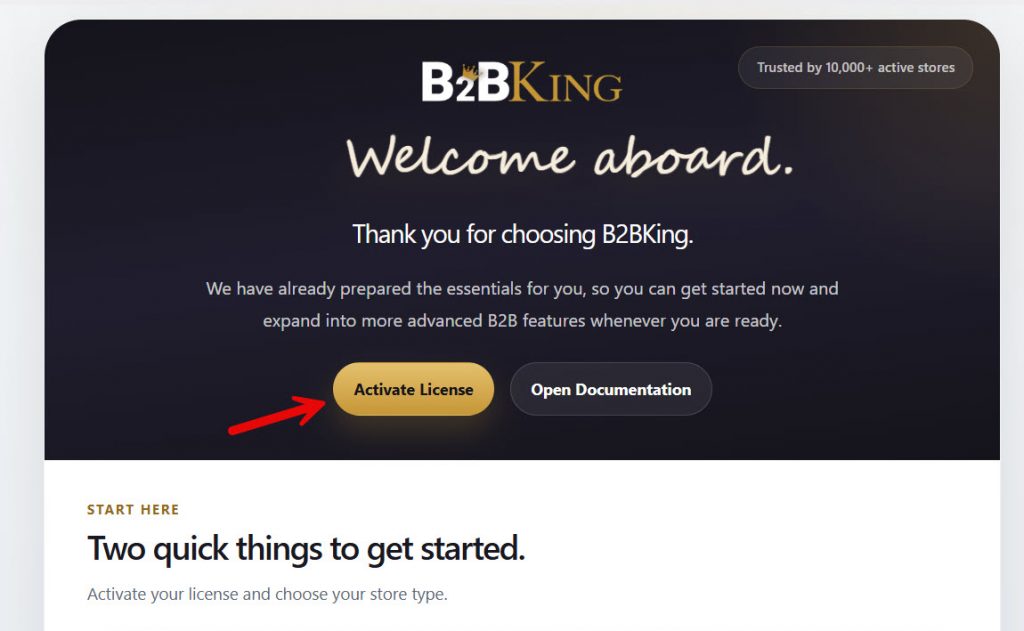
Next, it is time to activate your license key.
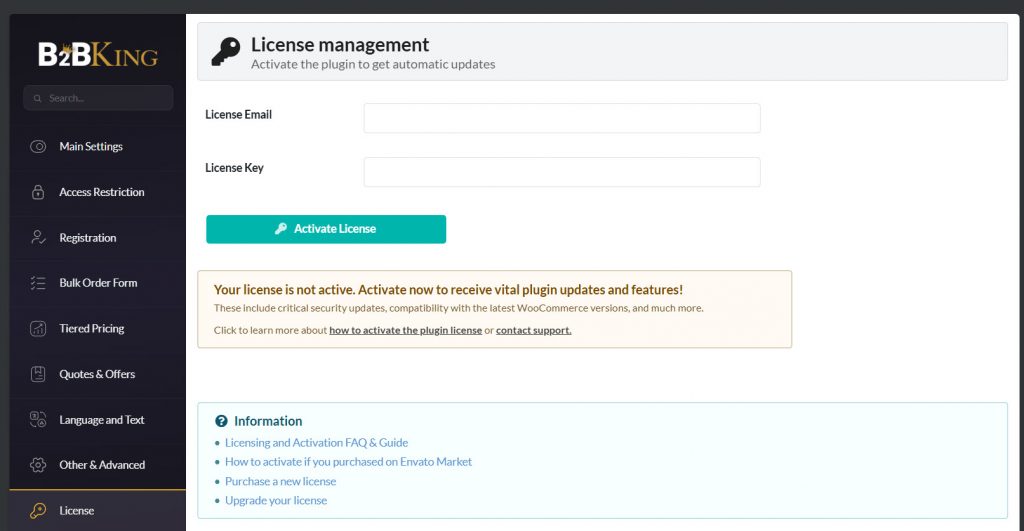
Open up the license settings and enter your
- License email
- License key
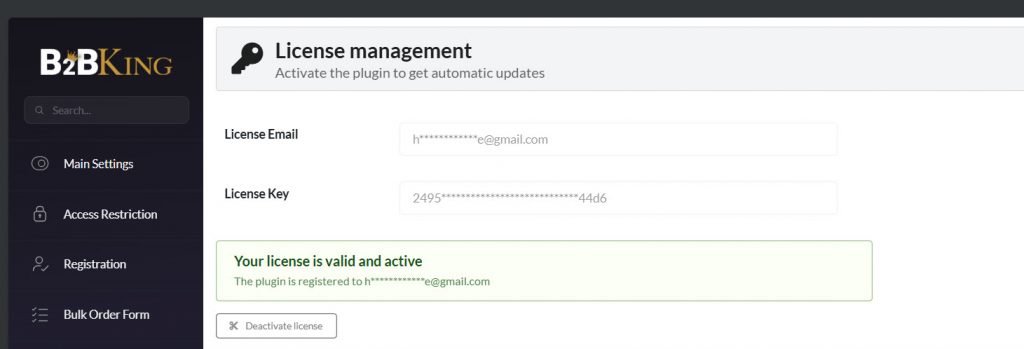
If the credentials are correct, you will see the success message.
Now, it is time to start using the plugin to create the wholesale store. On the left-hand side of the WordPress dashboard, you will see the plugin’s settings.
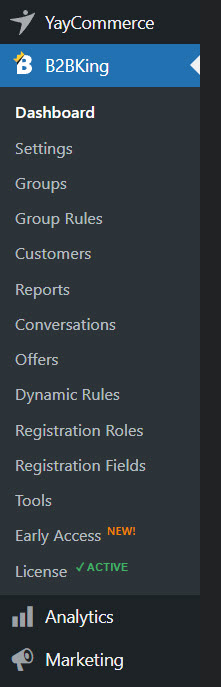
There are options like:
- Dashboard
- Settings
- Group
- Group rules
- Customers
- Reports
- Conevrsations
- Offers
- Dynamic rules
- Registration roles
- Registration fields
- Tools
- Early access
- License
Let’s start with the settings.
B2BKing Main Settings
Under the main settings page, you have every option you need to run a perfect wholesale store.
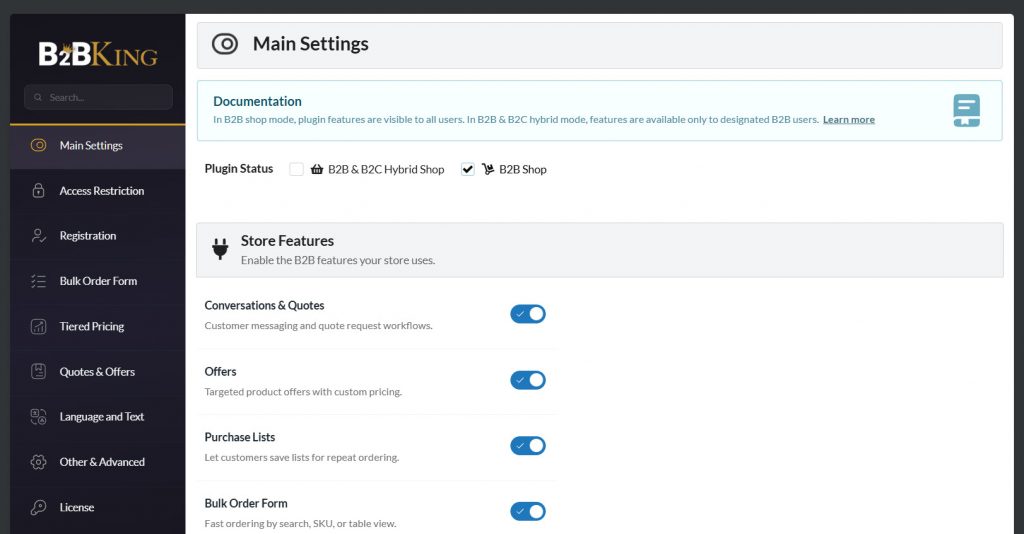
You will see options like:
- Main settings
- Access restriction
- Registration
- Bulk order form
- Tiered pricing
- Quotes & Offers
- Language and Text
- Other and Advanced
- License
From here, we can avoid the license settings as we have already finished them. The first thing you will do is set up the store type.

If you choose B2B Shop, you will be selling only to businesses. B2B and B2C mean you will be dealing with both businesses and regular customers. Next, you will be dealing with the features you need.
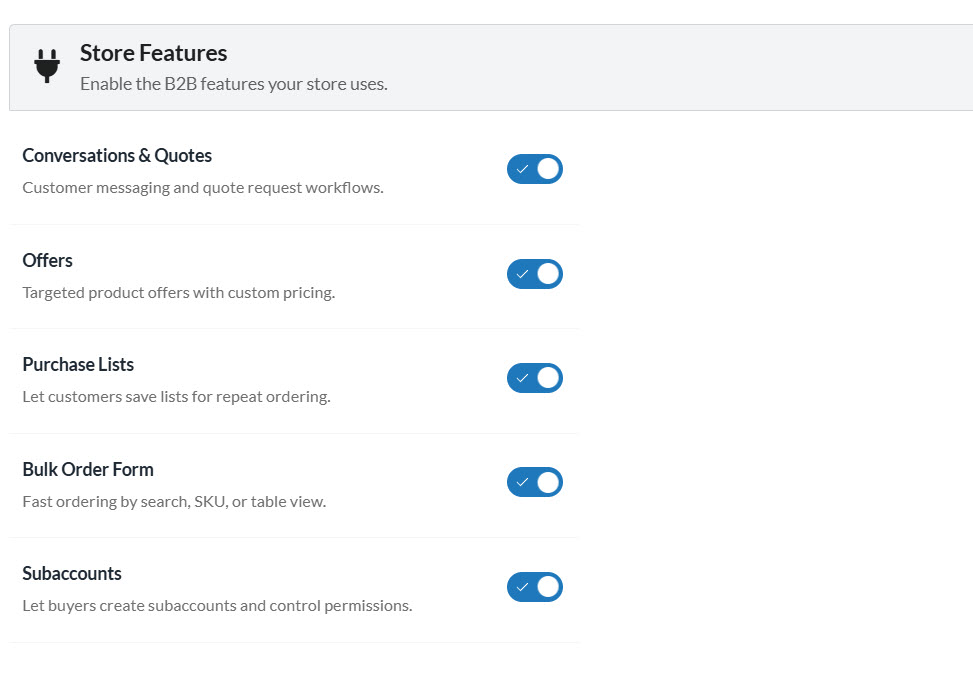
Select the features you need and save the settings.
Set Up Quota Button
When your customers order in bulk, they might be interested in special pricing. So instead of them paying the full amount, they could request a custom quota. This is a wonderful feature for wholesale stores.
To enable this, go to the Quotes and Offers tab. Enable the option based on your liking and save it.
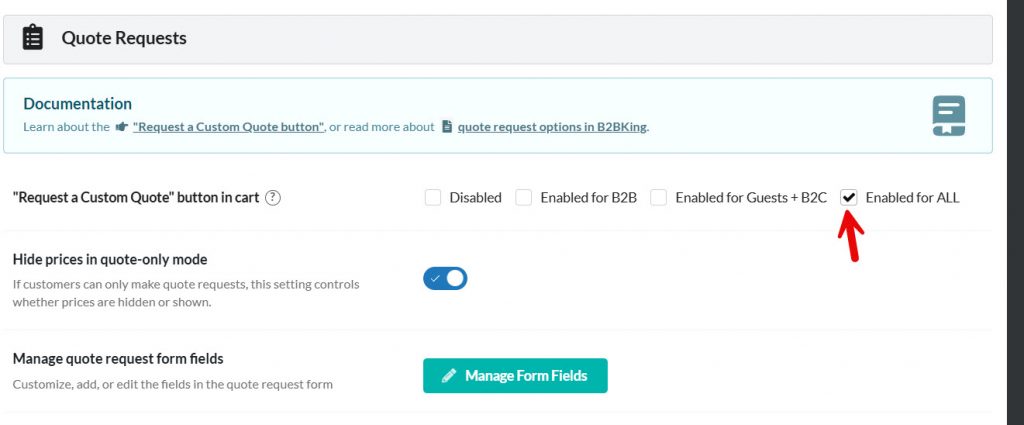
Once you have enabled it, test it from the front end. You can add some products to your cart and visit the cart page. There, you will see the quota button.
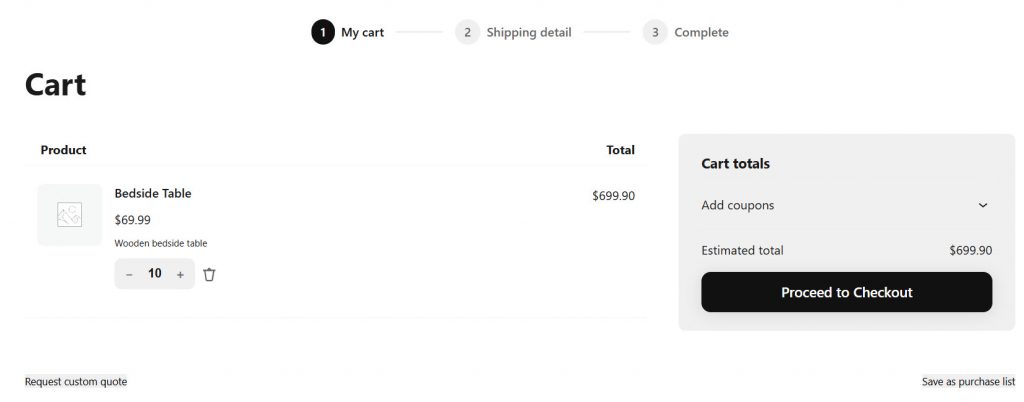
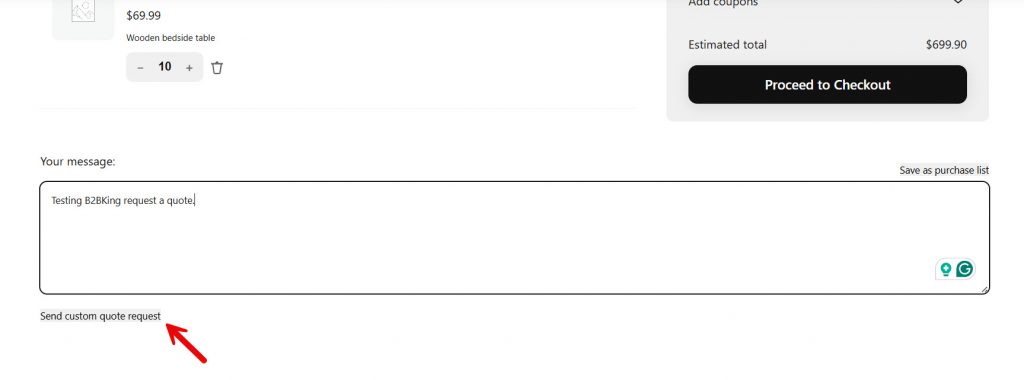
Depending on your theme, button position, and style, it might look different, but it will be there. Once you click it, it will open a conversation box. Fill the form and send it.
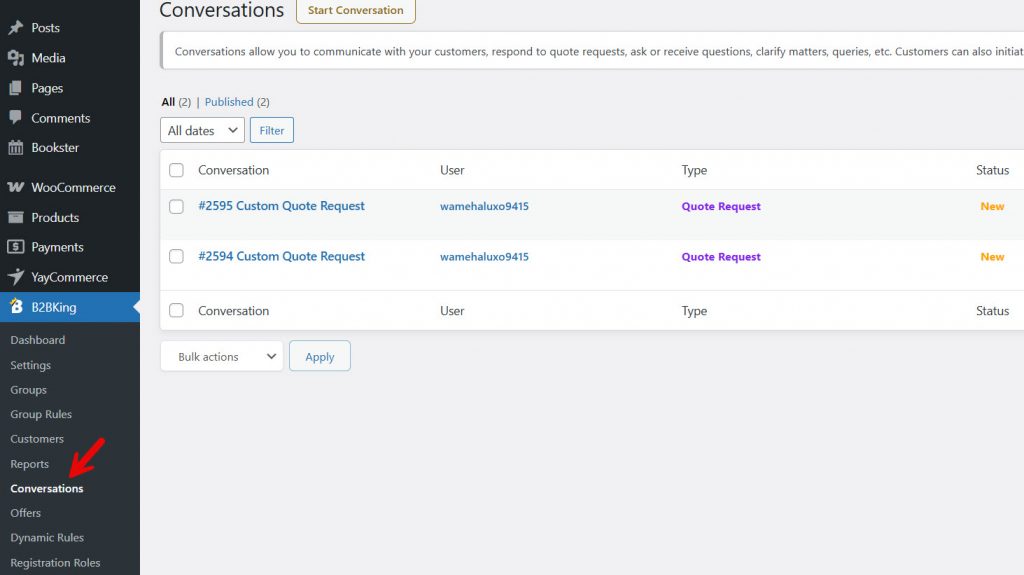
The store admin can see all the conversations from the B2BKing conversations section.
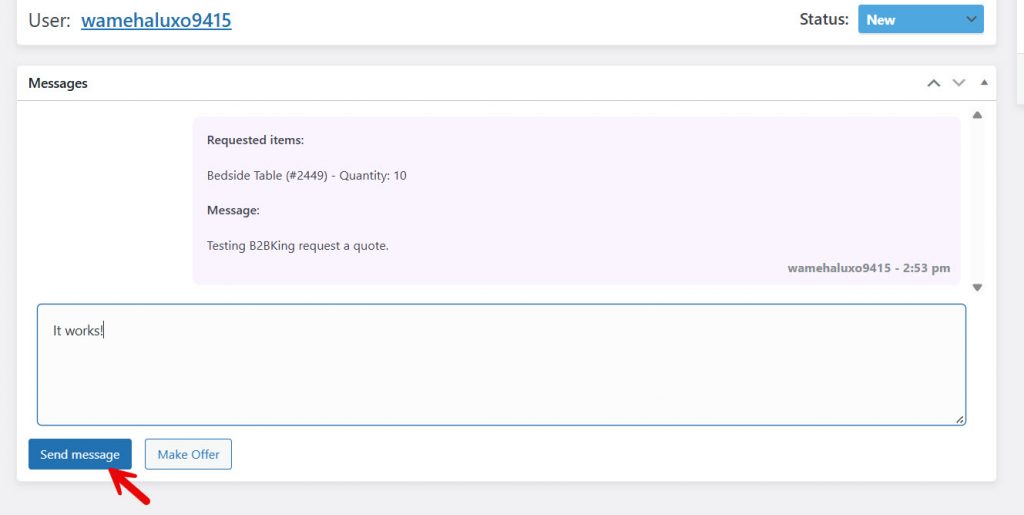
Once the store owner opens a conversation, he can respond to it and finalize things.
Customers can see all conversations under the “My Account” section.
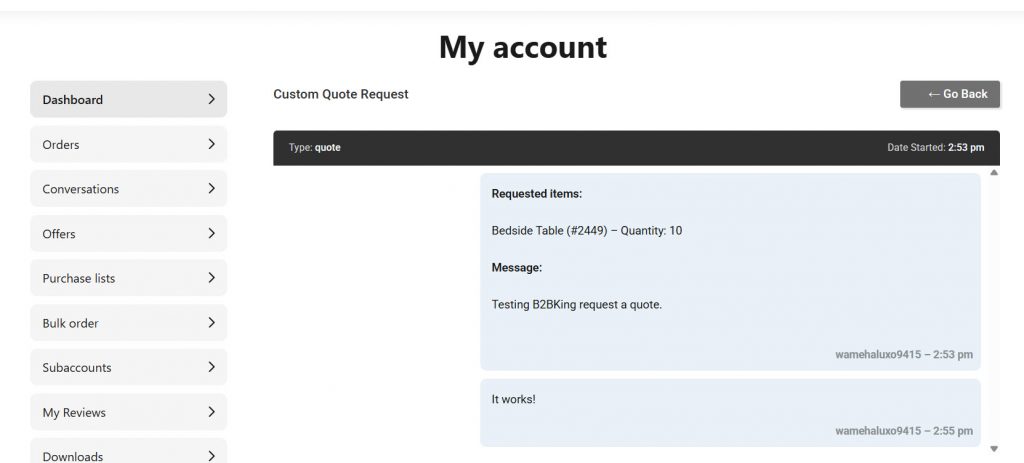
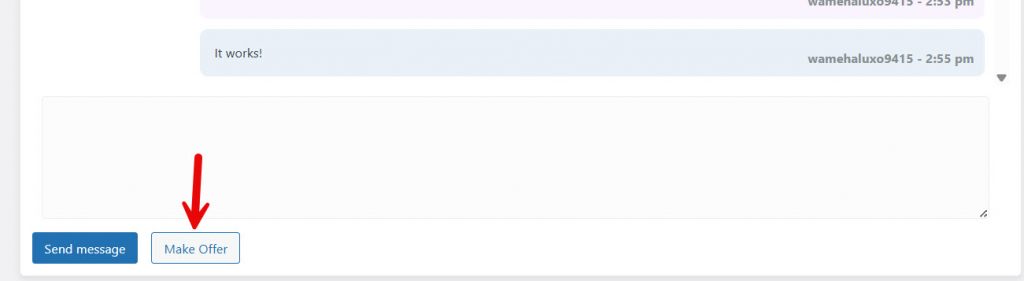
If the store owner decides to make a custom offer, he can click the Make Offer button.
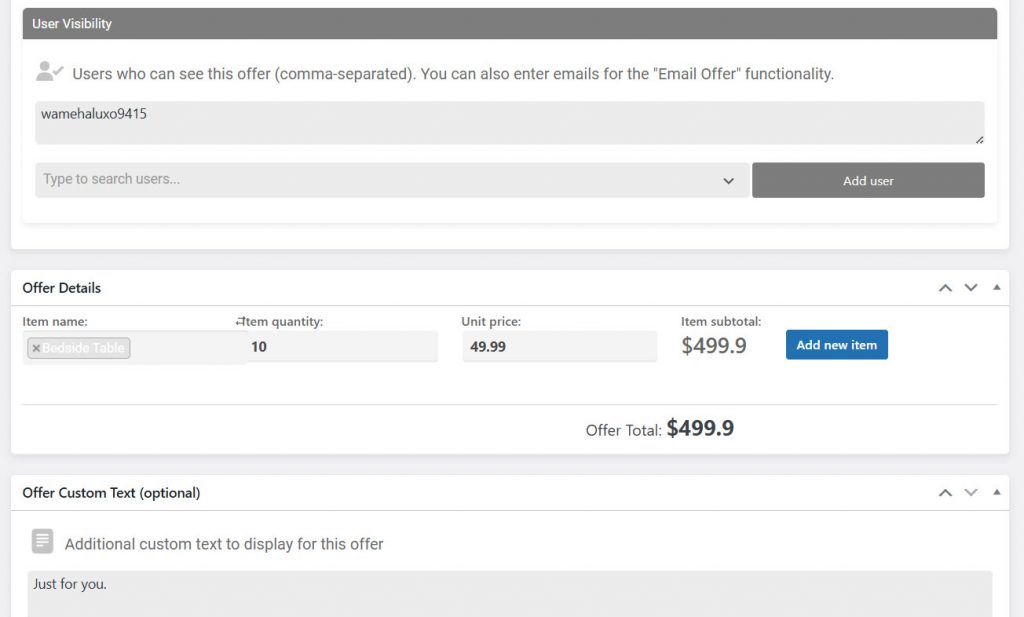
From there, you can tweak the pricing, user, group, and so on.
Guest Access Restriction
Next, we have a guest access restriction. If you need to limit who can view your product prices, use this feature.
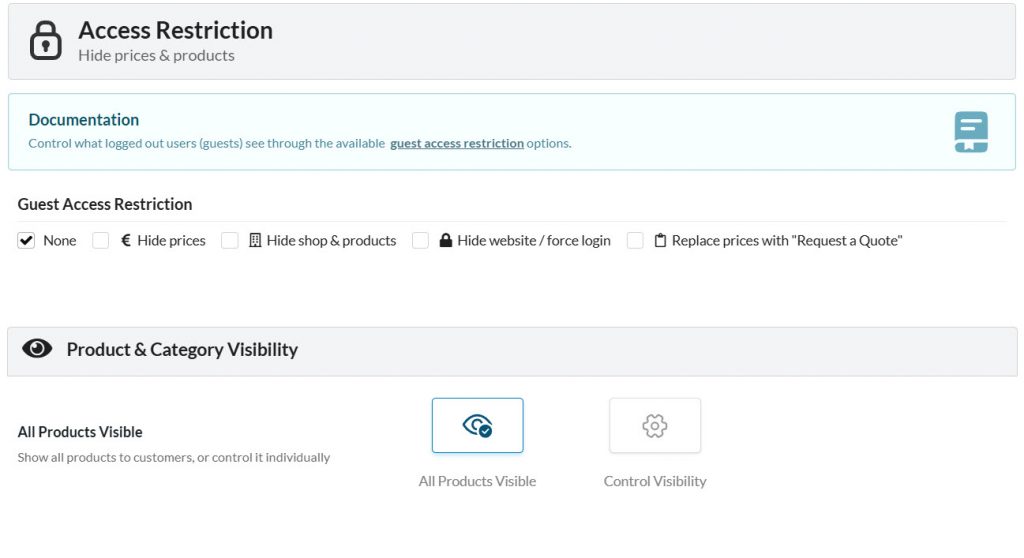
From the same page, you can also control visibility.
Groups
If you are ready to take things to the next level, it is time to create groups.
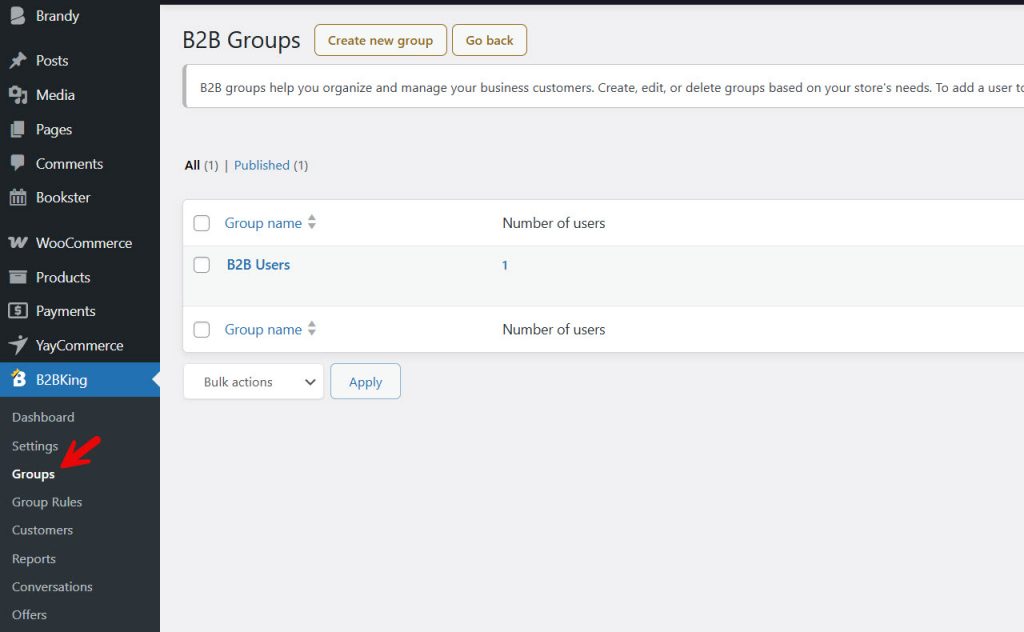
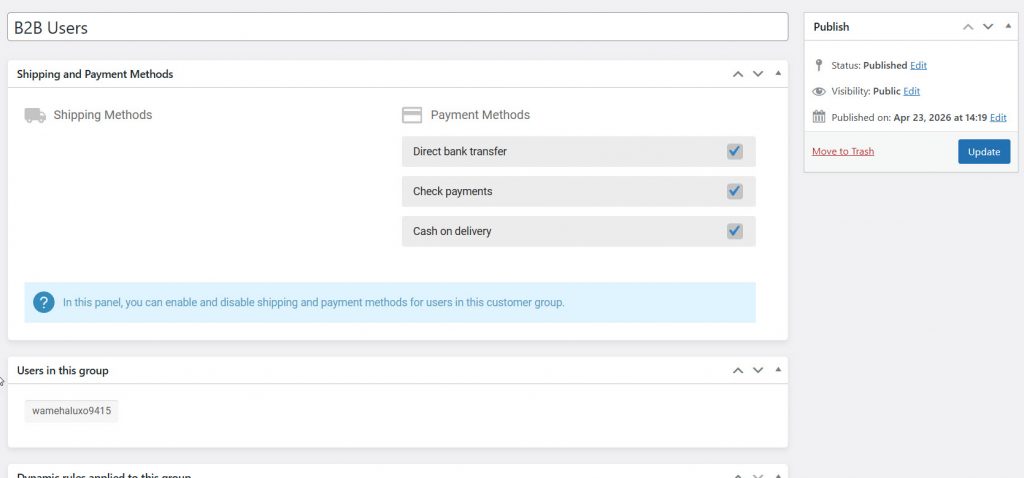
Each group can have individual rules and people.
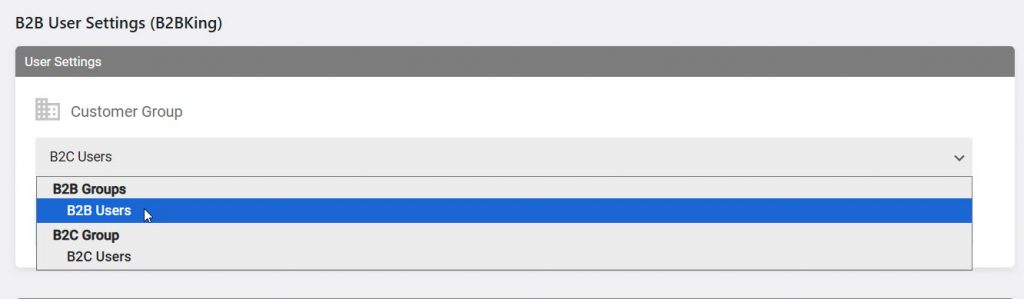
To add people to the group, go to users, select a user, and scroll down to B2BKing settings. From the dropdown, choose the group, and from now on, that specific user will be a part of the added group.
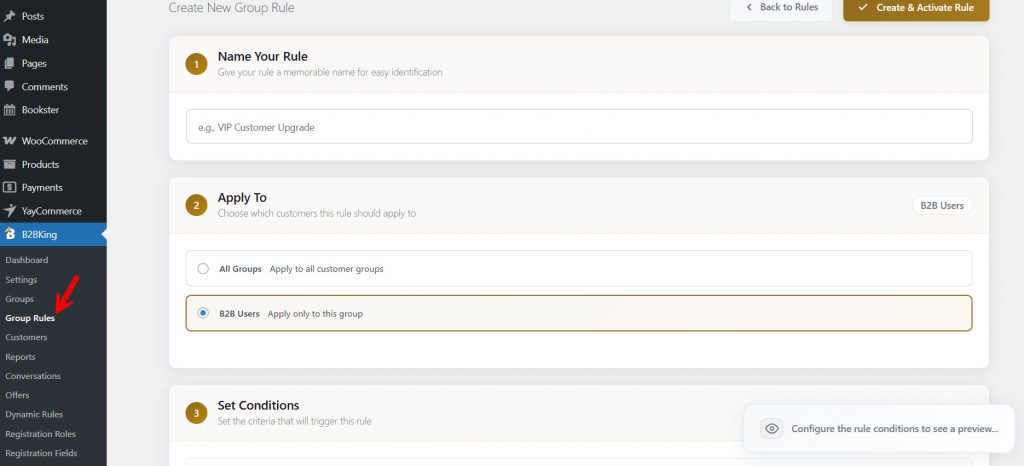
What makes it even more powerful are the group rules.
Registration
From here, you can configure the website’s registration.
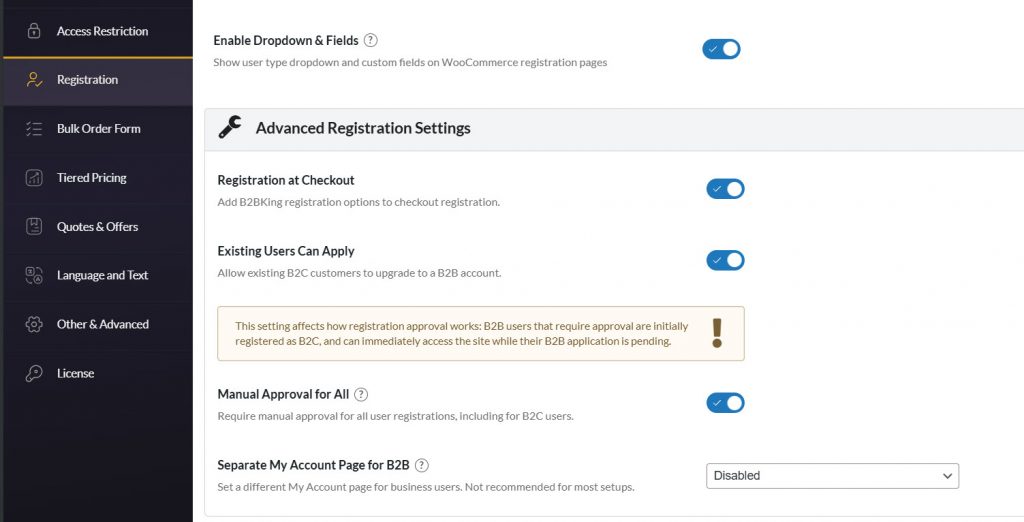
It would take you 20-30 minutes to figure out all the features B2BKing offers, but the development team did a good job with its documentation.
B2BKing Product Data
If you open any product and scroll to the product data, you will see the B2B users’ pricing.
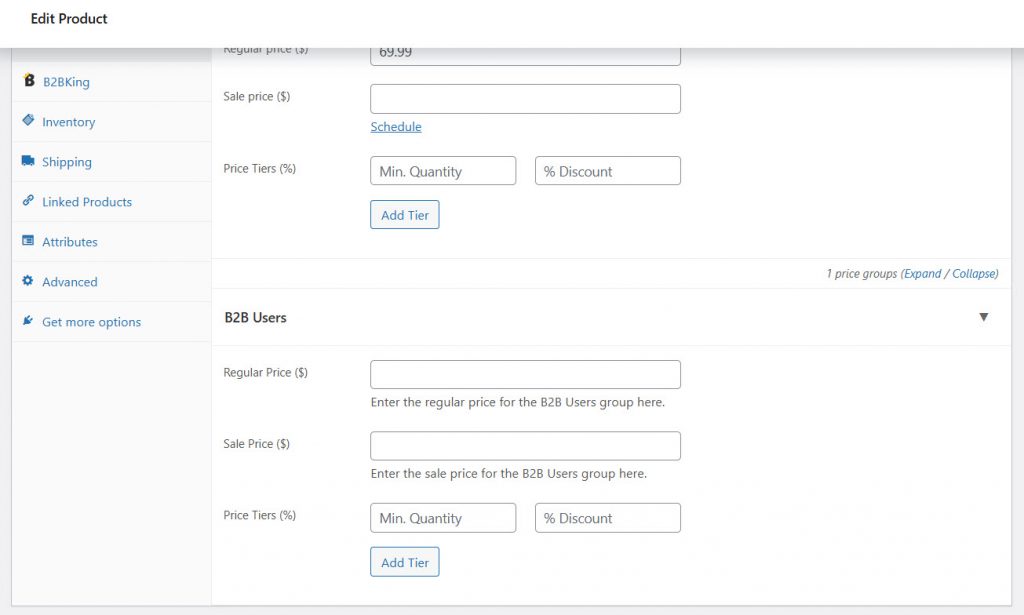
We have configured it like this:
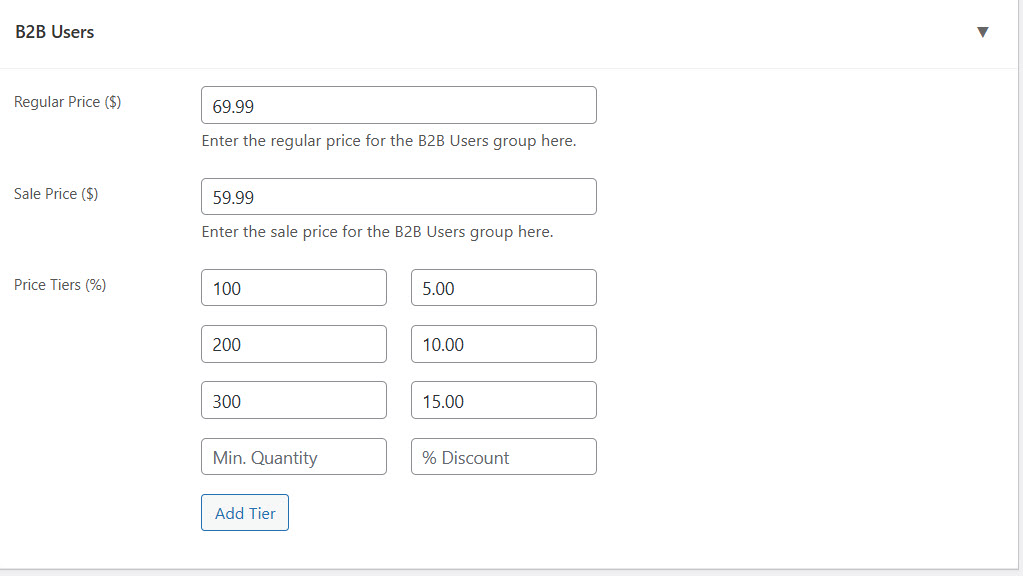
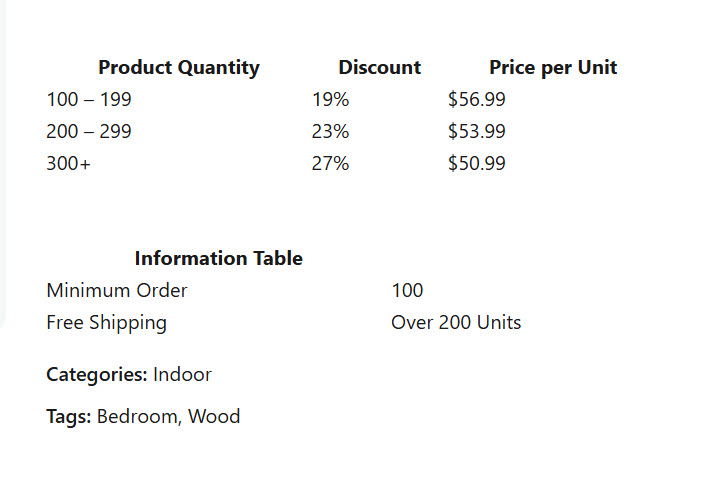
And on the front end, it will look like this:
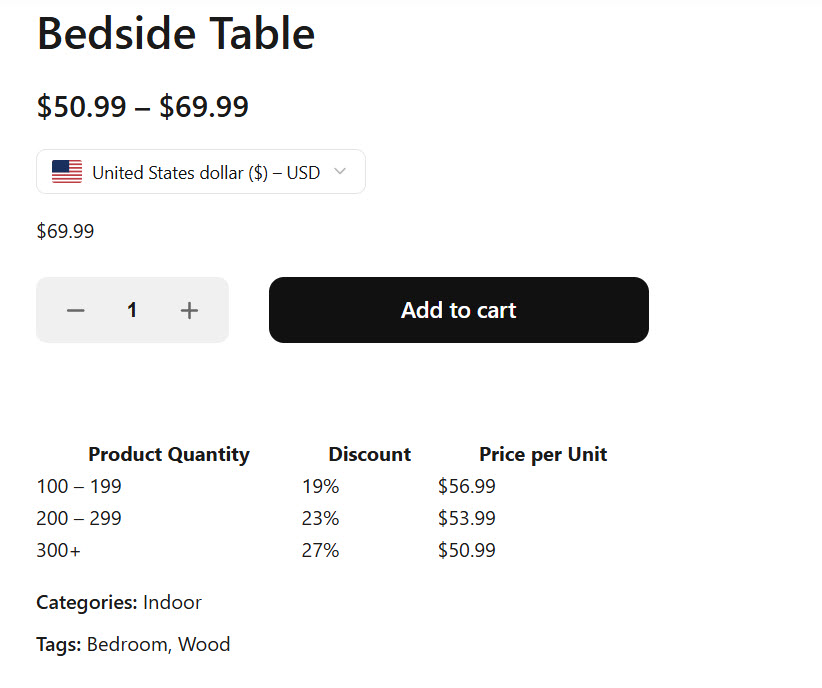
Now, if you go to the B2BKing data, you can see even more options.
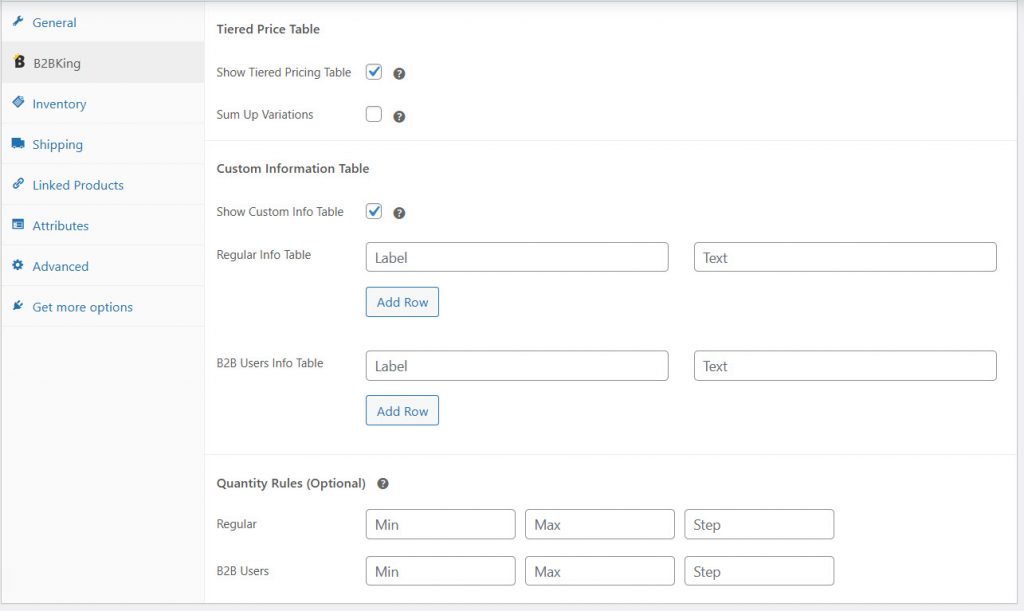
We have configured the info table with the minimum order count and the free shipping rule. On the front end, the data will look like this:
That’s it!
This is how you can use B2BKing to create a wholesale website in WordPress. This was a very short guide to help you get into the wholesale system, but if you need more help, feel free to contact B2BKing’s official support team. They will help you figure out every issue.
Get Started with B2BKing
If you are ready to get started with the B2BKing plugin, follow this URL:
Frequently Asked Questions
Now, let’s take a look at some of the frequently asked questions and answers regarding this topic.
What makes B2BKing a good WooCommerce wholesale plugin?
B2BKing stands out for offering a comprehensive set of B2B features in a single plugin. It includes wholesale pricing, user roles, bulk ordering, quote requests, and visibility controls, making it a strong all-in-one solution for managing wholesale customers.
Can B2BKing handle different pricing for wholesale customers?
Yes, B2BKing allows you to create advanced pricing rules, including tiered pricing, role-based pricing, and customer-specific discounts. This makes it easy to offer flexible pricing tailored to different types of wholesale buyers.
Does B2BKing support private or hidden wholesale stores?
Yes, B2BKing lets you hide prices or entire products from non-logged-in users. You can create a private wholesale experience where only approved customers can view pricing and place orders.
How does B2BKing improve the wholesale ordering process?
B2BKing includes bulk order forms and quick-ordering features that make it easy for customers to add multiple products to their cart. This significantly speeds up the buying process for wholesale clients.
Can I allow customers to request custom quotes with B2BKing?
Yes, B2BKing includes a built-in quote request system. This allows wholesale customers to negotiate pricing, which is especially useful for large or custom orders.
Is B2BKing suitable for large or growing wholesale businesses?
Yes, B2BKing is designed to handle complex B2B requirements. Its advanced rules, flexible pricing, and scalability make it a strong choice for businesses that plan to grow their wholesale operations.
Does B2BKing integrate well with WooCommerce features?
Yes, B2BKing works directly within WooCommerce and supports its core features like payments, shipping methods, and product management. This makes it easy to extend your existing store into a full wholesale platform.
Is B2BKing worth it compared to other wholesale plugins?
B2BKing offers a wide range of built-in features that often require multiple plugins in other solutions. This makes it a cost-effective and powerful option for businesses looking for a complete WooCommerce wholesale setup.
Conclusion
B2BKing offers a comprehensive solution for anyone looking to build and manage a wholesale store in WooCommerce.
In this article, we explored what a WooCommerce wholesale plugin is, what features to look for, and how B2BKing stands out as a feature-rich option for B2B businesses. We also walked through how to set it up, from configuring user roles and pricing rules to enabling bulk ordering and quote requests.
With its wide range of built-in features and flexibility, B2BKing makes it easier to create a professional wholesale experience without relying on multiple plugins. It is a strong choice for businesses that want to streamline their B2B operations and scale efficiently.
Which feature of the plugin do you like the most?
Let us know in the comments.