

Are you looking for the best WordPress image SEO tips? If you are, keep reading this article. Here, we will show you 15 of the best tips you can use to improve your website’s image SEO.
Images play a critical role in how users and search engines experience a WordPress website. Strong image SEO helps search engines understand what your visuals represent, improves image search visibility, and supports your site’s overall SEO performance.
When you optimize images in WordPress using proven best practices, you improve page speed, usability, and rankings across both regular search results and image search results.
From choosing the right image size and image format to adding descriptive alt text, image optimization is not just about appearance. It is about helping search engines understand the image and its context within your content.
Poorly optimized images in WordPress, such as large image files or missing image metadata, can negatively affect performance and SEO.
This guide covers practical image SEO best practices to optimize your images for search engines, improve image SEO, and get better results from images on your WordPress site.
First, let’s see why WordPress image SEO is important.
Table of Contents
Why WordPress Image SEO Is Important
Image SEO is essential because images in WordPress directly affect search visibility, performance, and user experience.
When you optimize images using best practices, search engines can better understand what the image represents, how it relates to your content, and when it should appear in image search results.
Proper image optimization goes beyond visuals. It supports SEO in WordPress by improving load times, accessibility, and relevance for both users and search engines.
- Helps search engines understand images on your website through alt text and image metadata
- Improves visibility in Google Image Search and other image search results
- Reduces page load time by using the right image size, image file formats, and image compression
- Enhances user experience by displaying images clearly without slowing down the WordPress site
- Supports images for search engines by providing context through descriptive image text
- Strengthens site performance and SEO when optimizing your images for SEO
- Works alongside a WordPress SEO plugin and image optimization plugins to automate optimization
- Ensures every new image uploaded to the WordPress media library follows SEO in mind
- Plays a crucial role in optimizing your WordPress website for both users and search engines
15 Best Tips for Boosting WordPress Image SEO
In a nutshell, the tips we have are:
- Choose the right image that matches your content and search intent
- Optimize images before uploading them to WordPress
- Use the correct image format for better performance and quality
- Compress images to reduce image file size without losing quality
- Follow recommended image sizes for WordPress images
- Use descriptive and SEO friendly image file names
- Add meaningful alt text to all images
- Optimize image captions where they add context
- Place images strategically within your content
- Optimize images in WordPress posts and pages consistently
- Create and submit an image sitemap for better indexing
- Use an image CDN to serve images faster
- Ensure images load quickly to improve page speed
- Avoid using large or unoptimized images
- Continuously monitor and improve your WordPress image SEO
Below, we will review the options in detail.
1. Choose the Right Image for SEO
Choosing the right image is a foundational step in improving image SEO for WordPress. Images should be relevant to the content, clearly support the topic, and add value for users and search engines.
Using generic or unrelated images can undermine optimization efforts and diminish their impact in search results. Always select high-quality images that clearly illustrate the content and align with user intent.
Image size and format also matter when choosing the right image. Large images can slow down your WordPress site, while poorly chosen formats can affect image quality. Resize images before uploading and select the appropriate format (e.g., JPEG or PNG) based on the image type.
Consistently using relevant, optimized images helps search engines better understand your content, improves user experience, and strengthens overall image SEO across your WordPress website.
2. Optimize Images Before Uploading
Optimizing images before uploading them to WordPress is one of the most effective image SEO best practices. Raw photos from cameras or design tools often have large file sizes, which can slow page load times and negatively impact SEO.
Before uploading an image, resize it to the required dimensions and compress it to reduce file size without sacrificing visual clarity.
Choosing the correct image format is equally important. JPEG works well for photographs, while PNG is better for graphics that need transparency. This step ensures better image quality and faster loading times from the start.
When images are optimized before entering the WordPress media library, plugins have less work to do later. This proactive approach improves performance, enhances user experience, and helps search engines process images on your WordPress site more efficiently.
3. Use the Correct Image Format
Choosing the correct image format is critical to WordPress image SEO and overall site performance. Different image formats serve other purposes, and using the wrong one can increase image size without adding visual value.
JPEG is ideal for photographs because it balances image quality and file size effectively. PNG is best suited for images that require transparency or sharp detail, but it often results in larger file sizes.
WebP and AVIF are modern image formats that provide smaller image sizes while maintaining high image quality, making them suitable for most images in WordPress. Selecting the best format helps optimize pictures for faster loading, improves image optimization, and supports better search engine visibility.
When images are in the correct format, WordPress pages load faster, user engagement improves, and images perform better in image search results. Consistently using efficient image formats ensures optimized images without sacrificing visual clarity.
4. Compress Images Without Losing Quality
Image compression is essential for improving WordPress image SEO while maintaining a professional visual appearance. Large image files increase page load time, which affects user experience and search engine rankings.
The goal is to reduce image size without affecting image quality, ensuring images remain sharp and clear across devices. Lossy and lossless compression techniques optimize images based on use cases.
Lossy compression removes unnecessary image data to achieve smaller file sizes, while lossless compression preserves the original image quality. Selecting the correct compression method depends on the image type and purpose.
Consistent image compression across your WordPress site ensures faster page load times, better Core Web Vitals, and improved image search visibility. You can use a plugin such as ShortPixel for this.
When images are properly compressed, search engines can crawl and index them more efficiently, supporting overall SEO performance without compromising visual standards.
5. Follow Recommended Image Sizes
Following recommended image sizes is essential for effective image SEO and overall WordPress performance. Using images that match standard dimensions helps reduce image file size while maintaining high image quality.
Oversized images slow down page loading and negatively affect user experience, even if WordPress automatically resizes them for display. Choosing the right image size before uploading ensures that images fit your layout correctly and load efficiently across devices.
WordPress generates multiple image sizes by default, but uploading appropriately sized images gives you better control over optimization. This practice also helps search engines process images more efficiently and improves visibility in image search results.
By consistently using recommended image sizes, you optimize images for faster load times, improve site performance, and enhance SEO outcomes without sacrificing visual clarity or design consistency.
6. Use SEO Friendly Image File Names
Using SEO-friendly image file names is a simple yet effective image SEO best practice for WordPress websites. Search engines rely on file names to understand what an image is about, especially before other image data is processed.
Generic file names like IMG_1234.jpg provide no context, whereas descriptive file names help optimize images for search engines. Before uploading an image to WordPress, rename the file to describe its content clearly.
Use lowercase letters and separate words with hyphens so search engines can read them correctly. A well-named file supports image optimization and improves the chances of appearing in image search results. SEO-friendly file names work best when combined with alt text, appropriate image sizes, and image compression.
Since WordPress automatically preserves the original file name, taking a moment to rename images before upload improves WordPress image SEO and contributes to better overall optimization without additional plugins.
7. Add Descriptive Alt Text
Adding descriptive alt text is one of the most essential WordPress image SEO best practices. Alt text helps search engines understand what an image represents and improves accessibility for users who rely on screen readers.
When you optimize images with clear, accurate alt text, you provide context that supports both SEO and the user experience. Effective alt text should describe the image naturally and align with the surrounding content.
It should explain what the image shows, not just list keywords. This helps WordPress images appear in image search results and supports SEO for images without over-optimization.
Alt text is fundamental when images fail to load, as it replaces the visual element with meaningful information. When adding images through the WordPress media library, always review and update the alt text field. Consistently using descriptive alt text helps improve
8. Optimize Image Captions
Optimizing image captions is essential to WordPress image SEO and user engagement. Image captions provide visible context that helps users understand what the image represents, especially when scanning content.
Well-written captions can reinforce the surrounding text and improve how WordPress images contribute to overall SEO. From an optimization perspective, captions give search engines additional signals about image relevance.
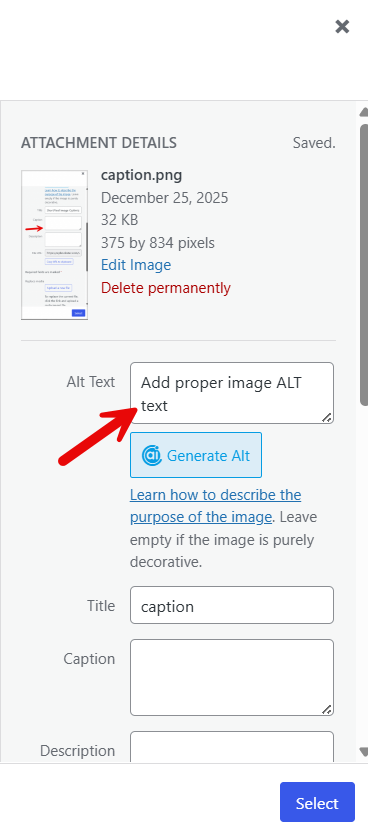
When captions naturally include descriptive keywords related to the content, they support image SEO without keyword stuffing. Captions also improve accessibility by complementing alt text and helping users interpret visual content correctly. To optimize image captions, keep them concise, relevant, and aligned with the page topic.
Avoid repeating the alt text verbatim. Instead, focus on delivering value to readers while adhering to image optimization best practices that enhance usability and search visibility.
9. Place Images Strategically in Content
Placing images strategically within your content improves image SEO and enhances user readability. Images should support the surrounding text and appear near relevant headings or paragraphs, so search engines can better understand their context.
Adding images near the top of the page can also improve visibility in image search and increase user engagement. Avoid clustering multiple photos in a single section, as this can affect page speed and disrupt content flow.
When adding images in WordPress, ensure each image aligns with the topic and adds value rather than serving as decoration.
Strategic placement helps optimize images for search engines, improves user engagement with your content, and strengthens overall SEO performance. Well-positioned images make your WordPress pages more informative, visually balanced, and easier for search engines to interpret accurately.
10. Optimize Images in WordPress Posts
Optimizing images in WordPress posts is critical to improving image SEO and overall site performance. Each time you upload a photo, ensure the image size matches the content layout to avoid loading unnecessarily large image files.
Proper image optimization helps search engines understand images in WordPress and improves visibility in image search results. Use descriptive file names, add relevant alt text, and select the appropriate image format for better compression.
Optimizing images in WordPress posts also involves resizing them before upload and applying compression to reduce file size without compromising quality.
When images are optimized correctly, pages load faster, users stay engaged longer, and search engines reward your WordPress site with better rankings. Consistently optimizing images across posts is one of the most effective best practices to improve your WordPress image SEO.
11. Create an Image Sitemap
Creating an image sitemap helps search engines more efficiently discover and index images in WordPress.
An image sitemap provides structured information about images on your website, making it easier for search engines to understand each image’s content and its relationship to your content.
This is especially useful for WordPress sites with many images, galleries, or background images that may not be easily discovered through standard crawling. When you create an image sitemap, include necessary image data such as image URLs, captions, titles, and relevant context from the page.
This improves image SEO and increases the chances of your images appearing in image search results. Many WordPress plugins can automatically generate and update image sitemaps whenever you upload a new image.
Keeping the image sitemap up to date ensures better visibility, improved indexing, and stronger overall SEO performance for your WordPress website.
12. Use an Image CDN
Using an image CDN is an effective way to optimize images and improve WordPress image SEO. A CDN stores image files across multiple servers and delivers them from the server closest to the visitor.
This reduces load time and improves image loading speed across your WordPress website. Faster delivery enables search engines to crawl images more efficiently and enhances image search performance.
An image CDN also helps manage significant image traffic without affecting server performance. When images in WordPress load faster, users stay longer and interact more with your content.
This improves overall SEO in WordPress. A CDN works well alongside image compression and proper image size optimization, ensuring images are delivered quickly without sacrificing quality. Using an image CDN is a best practice for improving image optimization, user experience, and long-term image SEO results.
13. Improve Image Loading Speed
Image loading speed plays a significant role in image SEO and overall WordPress performance. Large image file sizes can slow down your WordPress website and negatively affect user experience and search engine rankings.
To optimize images, always resize them to the recommended size before uploading to WordPress. This prevents WordPress from serving unnecessarily large photos on your pages. Image compression is another essential step to improve loading speed without sacrificing image quality.
Compress images during optimization to reduce file sizes while maintaining clear visuals. Using proper image formats also helps optimize images for search engines and faster delivery. Improving image loading speed ensures images load quickly, improves image search visibility, and strengthens WordPress SEO over time.
14. Avoid Large and Unoptimized Images
Large, unoptimized images are among the most common reasons a WordPress website loads slowly.
When you upload an image without optimizing it, the file size is often much larger than necessary, which increases page load time and negatively impacts image SEO.
Search engines prioritize fast websites, so reducing image size is essential for better visibility in image search results.
Before adding images to WordPress, resize them to the exact dimensions required for your layout. Using oversized images and letting WordPress scale them down still forces browsers to load unnecessary image data.
Image compression also plays a key role, reducing file sizes without sacrificing image quality. Optimizing your images improves performance, enhances the user experience, and supports overall SEO in WordPress.
15. Continuously Improve WordPress Image SEO
WordPress image SEO is not a one-time task. It requires ongoing optimization as you add new images and update existing content.
Each time you upload an image, review its file name, image size, and alt text to ensure it aligns with image SEO best practices. Consistent optimization helps search engines better understand WordPress images and improves long-term visibility.
Regularly audit older images in your WordPress media library and optimize those uploaded without compression or proper metadata. As your site grows, image optimization should remain part of your SEO workflow.
Continuously improving image SEO supports faster load times, better image search performance, and stronger overall SEO results for your WordPress website.
Frequently Asked Questions
Now, let’s take a look at some of the frequently asked questions.
What is image SEO in WordPress?
Image SEO in WordPress involves optimizing images so search engines can understand, index, and rank them effectively. This includes using the appropriate image size, adding alt text, selecting appropriate image formats, and optimizing images for search engines. Image SEO is essential because images in WordPress support overall SEO and visibility in image search results.
Why is image SEO important for WordPress websites?
Image SEO is vital because it helps improve image SEO, page speed, and user experience. Optimized images load faster, provide context for search engines, and improve search engine visibility. This also applies to image search, where properly optimized images can appear in Google Images.
How does alt text help optimize images for SEO?
Alt text helps describe the image to search engines and users who rely on screen readers. Using alt text correctly provides context to the image and helps search engines understand precisely what the image represents. Using alt text is a crucial best practice for WordPress images for SEO.
What image size should I use for SEO in WordPress?
Using the right image size is essential for image optimization. Large images should be resized before uploading to WordPress. Following recommended image sizes for SEO helps improve load speed and ensures images display correctly without affecting performance or SEO.
Does WordPress automatically optimize images?
WordPress automatically generates multiple image sizes when you upload an image, but it does not fully optimize images for SEO. You still need to optimize the images by resizing them, adding alt text, and using a WordPress image optimization plugin to improve image SEO.
Should I use an image optimization plugin in WordPress?
Using a WordPress image optimization plugin helps optimize images for SEO more efficiently. Image optimization plugins can compress images, automatically generate image sizes, and ensure that every new image adheres to best practices for image SEO.
Do background images need alt text for SEO?
Background images usually do not require alt text if they do not convey important information. For photos that convey meaning, adding alt text improves image SEO and ensures search engines understand what the image represents.
Conclusion
Image SEO is a critical part of optimizing a WordPress website for both search engines and users. By following image SEO best practices, you can optimize images without sacrificing quality and improve performance and visibility.
Choosing the right image size, using the best format, and applying proper compression help reduce file size without losing essential image data.
Image optimization plugins for WordPress make this process effortless by handling new image uploads and maintaining image sizes without compromising quality. Since Imagify uses intelligent compression, many site owners also look for top alternatives to Imagify that offer efficient image optimization.
Ultimately, choosing the right WordPress image optimizer improves image SEO, accelerates load times, and delivers stronger image search results, making image optimization clear and valuable to overall SEO.
Do you know any other tips?
Let us know in the comments.
