

Do you want to create a contact form in WordPress without a plugin? If you are looking for a simple guide, keep reading this article.
Creating a contact form is essential for any WordPress site, but you don’t always need a plugin to do it.
If you want a lightweight solution or prefer full control over your form’s structure and behavior, building a WordPress contact form without a plugin is a practical option.
By using simple HTML and a small amount of PHP, you can create a functional form that lets visitors send messages directly from your website.
This approach helps reduce plugin dependency, keeps your site lean, and gives you flexibility to customize the form exactly how you want. In this guide, you’ll learn how to create a basic contact form in WordPress without relying on third-party plugins.
First, let’s see why you need to create a contact form in WordPress without a plugin.
Table of Contents
Why You Need to Create a Contact Form in WordPress Without a Plugin
Creating contact forms in WordPress without relying on plugins is a smart choice for users who want simplicity, performance, and full control over their form setup.
Instead of installing a form builder or third-party contact form plugin, you can create a custom form in WordPress using basic HTML and PHP.
This method helps you avoid unnecessary plugin bloat, keeps your WordPress website lightweight, and allows you to customize the contact form exactly the way you need.
- Reduces plugin dependency and helps keep your WordPress website fast and lightweight
- Gives you full control over form fields, form submission behavior, and form data handling
- Allows you to create a simple contact form in WordPress without using a form plugin or shortcode
- Makes it easier to customize the contact form using custom HTML, CSS, and PHP code
- Avoids conflicts caused by form plugins like Contact Form 7, Ninja Forms, or drag-and-drop form builders
- Useful when you want to add a WordPress contact form directly to a page or template file
- Helps you build a custom form that matches your site design instead of relying on form templates
- Ideal for WordPress without plugin setups, where performance and simplicity matter
- Let’s you create a contact form page without installing a plugin like WPForms Lite or other form builder tools
- Prevents extra scripts and features that can slow down your site when using heavy form plugins
Contact Form with Plugins vs Without Plugins
| Feature | Contact Form with Plugins | Contact Form without Plugins |
|---|---|---|
| Setup method | Uses a form builder plugin from the WordPress dashboard to add a WordPress contact form | Uses HTML code and PHP code added to a WordPress page or template file |
| Ease of use | Easy to create forms using drag-and-drop form builder tools | Requires copy and paste of custom form code into your theme or page editor |
| Customization | Limited to plugin options unless you add custom CSS | Full control to customize the contact form layout, fields, and styling |
| Performance impact | Can slow down your site due to extra scripts and features | Lightweight and ideal for WordPress without plugin setups |
| Spam protection | Built-in spam protection, such as Google reCAPTCHA | Must be added manually using PHP validation with JavaScript |
| File upload support | Often included in form plugins | Requires custom handling with PHP for file upload fields |
| Maintenance | Needs regular plugin updates and compatibility checks | Depends on your theme files, like the functions.php file |
| Best use case | Good for users who want to easily create a contact form without coding | Best when you want to create a simple contact form in WordPress without a plugin |
| Design flexibility | Uses preset form templates and styles | Let’s you fully style the form using custom CSS |
| Placement | Added using a shortcode or a block in a WordPress post or contact page | Embedded directly into a WordPress page or custom post template |
| Dependency | Requires a plugin like WP Forms or another builder plugin | Works in standard WordPress without the need for extra plugins |
| Control over data | The plugin manages how form data is processed and stored | You control how the form is submitted and where the email address receives messages |
How to Create a Contact Form in WordPress Without a Plugin
Now, let’s see how to do it. We will be dealing with a lot of code. So, hang tight. First, we have to create a structure for the contact form. You can go to your contact page and add an HTML block there.
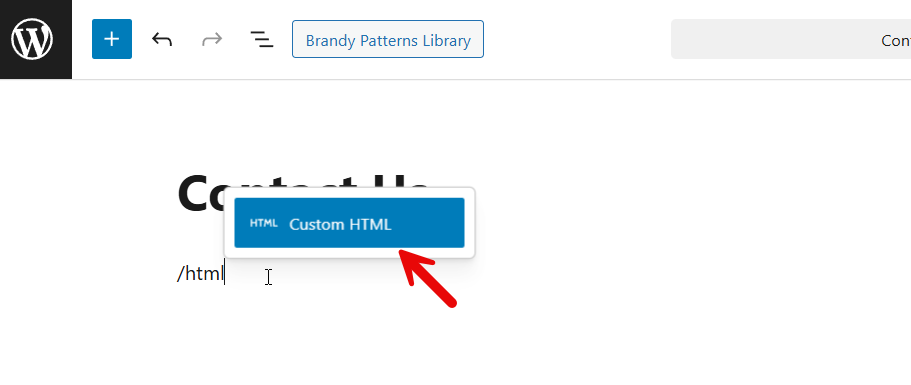
Once you are done, paste this code:
<form method="post">
  <p>
    <label>Your Name</label><br>
    <input type="text" name="cf_name" required>
  </p>
  <p>
    <label>Your Email</label><br>
    <input type="email" name="cf_email" required>
  </p>
  <p>
    <label>Your Message</label><br>
    <textarea name="cf_message" required></textarea>
  </p>
  <p>
    <input type="submit" name="custom_contact_submit" value="Send Message">
  </p>
</form>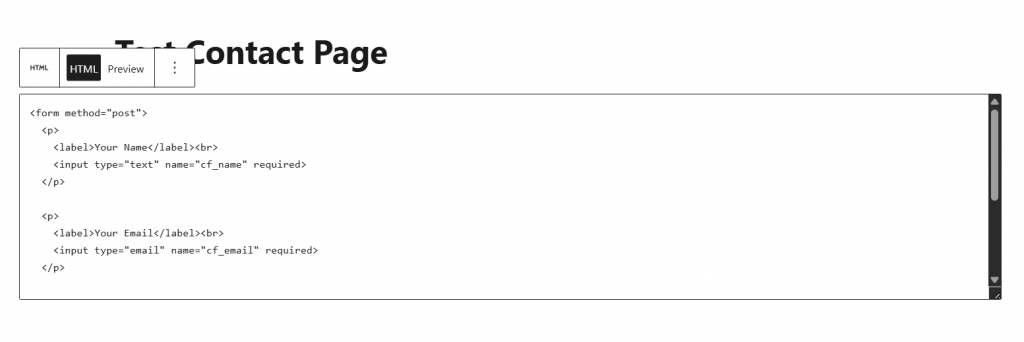
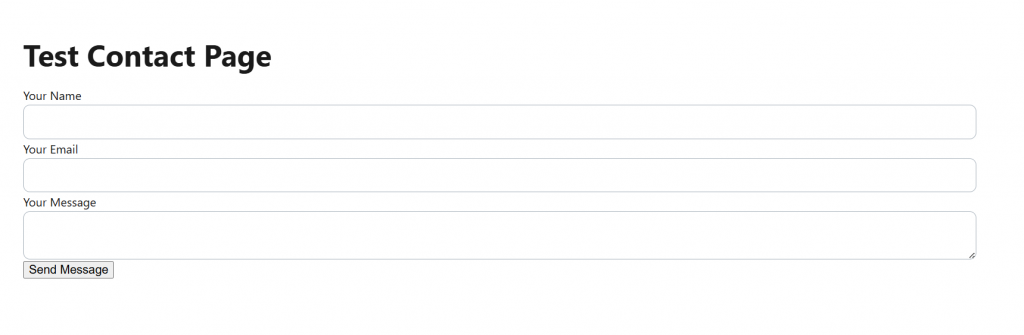
If you check the website’s front end, you can see the live form.
Now, we need to add a PHP snippet code to our theme’s functions.php file. The code can be added to the functions.php or a site-specific plugin.
The code you need to use is:
function custom_contact_form_handler() {
    if (isset($_POST['custom_contact_submit'])) {
        $name  = sanitize_text_field($_POST['cf_name']);
        $email = sanitize_email($_POST['cf_email']);
        $msg   = sanitize_textarea_field($_POST['cf_message']);
        $to = get_option('admin_email');
        $subject = "New Contact Form Message";
        $headers = "From: $name <$email>";
        wp_mail($to, $subject, $msg, $headers);
    }
}
add_action('init', 'custom_contact_form_handler');
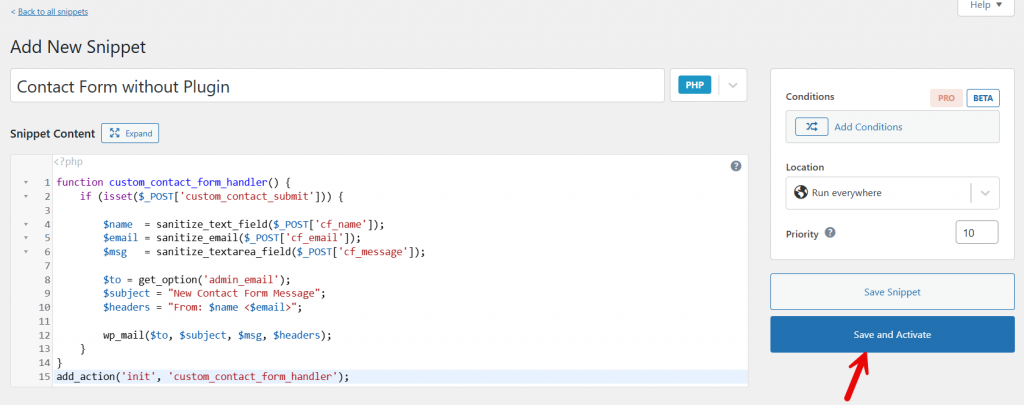
In this case, we will add the code using the Code Snippets plugin. So create a new snippet.
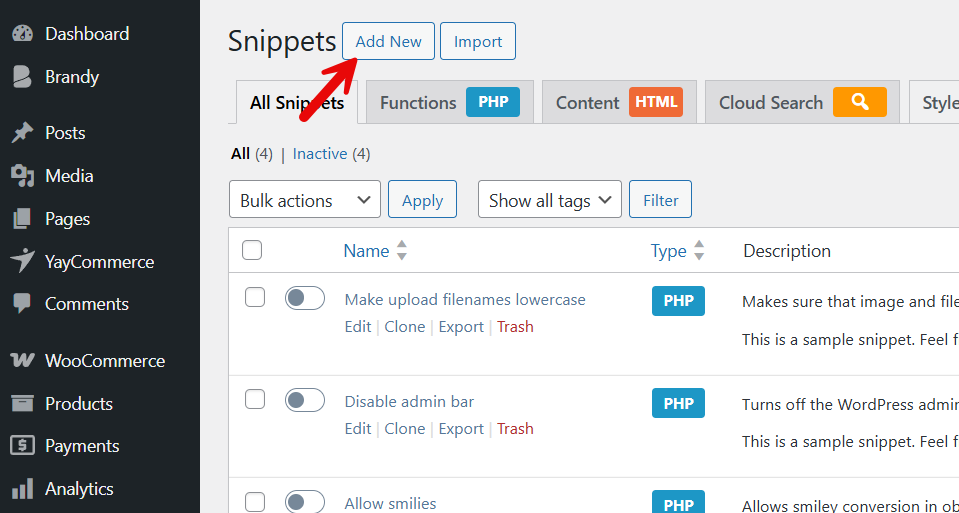
Name your snippet and paste the code. You can save and activate it after pasting the code.
Next, we have to style the form a little. You can use this CSS code for that:
form input, form textarea {
  width: 100%;
  max-width: 500px;
  padding: 10px;
}
form input[type="submit"] {
  background: #0073aa;
  color: #fff;
  border: none;
  padding: 10px 20px;
  cursor: pointer;
}
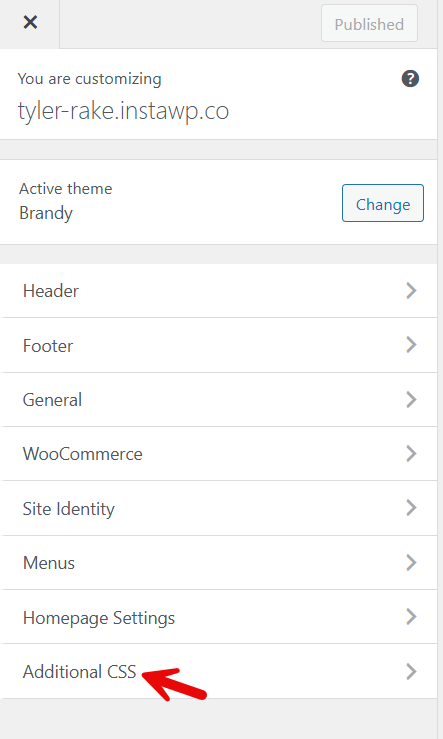
To add custom CSS, go to the customizer > additional CSS.
There, paste the CSS code we mentioned above.
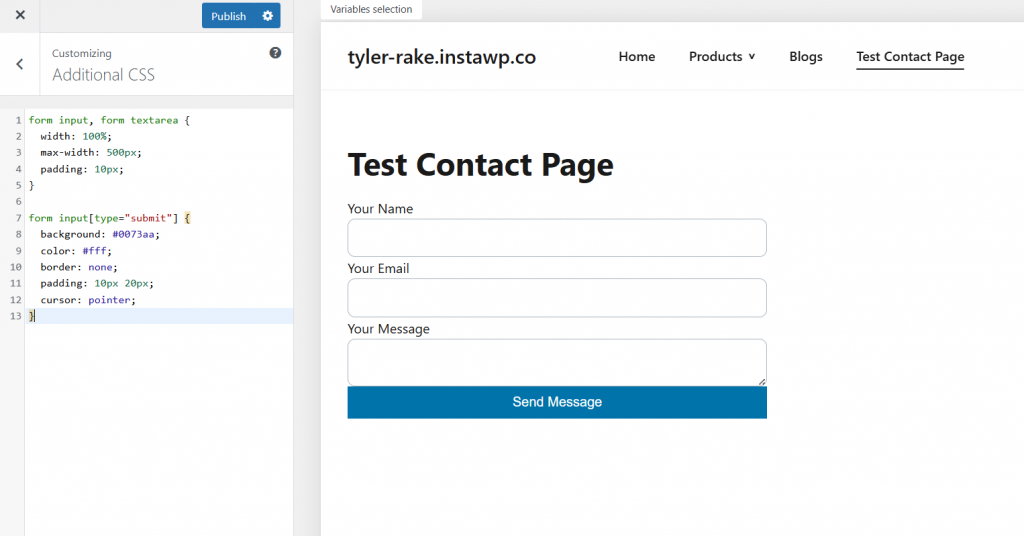
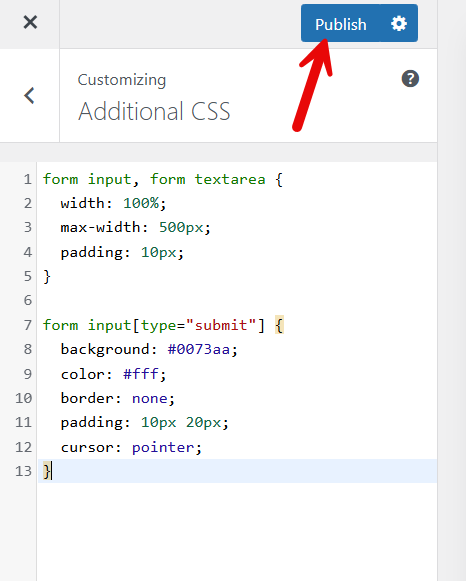
The code we shared is basic. If you need to style the contact form to match your branding, you’ll need to make some code tweaks. Once you are ok with the design, publish the changes.
That’s it!
This is how you can create a contact form in WordPress without a plugin. Now you can send a test email from the page, and it will land in your admin email address.
Here are some related articles you might like:
- 10 Best WordPress Speed Optimization Plugins
- 11 Best Acuity Scheduling Alternatives Tested in 2025
- 11 Best Import and Export Plugins for WordPress and WooCommerce
- 12 Ways to Reduce Bounce Rate in WordPress with Ease
- 14 Reasons Why Your Wellness Business Needs a Website
Frequently Asked Questions
Now, let’s take a look at some frequently asked questions and answers about this topic.
How can I create a contact form in WordPress without a plugin?
You can create a contact form in WordPress without a plugin by adding HTML and PHP code directly to a page or a file in your theme. This method lets you build a simple form, handle form submission yourself, and avoid relying on plugins, which is useful if you want a lightweight solution for a WordPress website without extra tools.
Is it better to use contact forms with or without plugins?
Using contact forms without plugins gives you more control over how the form works and prevents the addition of extra scripts that can slow down your site. A form in WordPress without plugins is ideal if you only need a basic contact us form, while plugins are better for advanced features without writing code.
What do I need to create a simple contact form in WordPress?
To create a simple contact form in WordPress, you need basic HTML for the form layout and PHP to process the form data. You can add the form code to a WordPress page or embed it in a template file, so visitors can submit the form directly on your site.
Will a custom contact form work on a WordPress website without plugins?
Yes, a custom form works well on a WordPress website without plugins, as long as it is coded correctly. Once the form is created, users can submit it and send messages, just like with a plugin-based contact form, without depending on a form builder or third-party tools.
Can I customize the contact form without using a plugin?
You can fully customize the contact form when you create one without a plugin. Since it is a custom form, you control the fields, layout, and styling, making it easy to match your site’s design and build a simple form that fits your needs.
Where should I add a contact form in WordPress without plugins?
You can add a contact form to any page in WordPress, such as a contact page, by either inserting the form code directly into the page editor or embedding it in a theme file. This allows you to place the form exactly where you want on your WordPress form layout.
Is creating a WordPress contact form without a plugin good for performance?
Creating a WordPress contact form without plugins can improve performance by avoiding the loading of unnecessary scripts and features. This approach helps keep your site fast while still letting you add a contact form on your WordPress website without relying on a plugin or form builder.
Conclusion
Creating contact forms in WordPress without a plugin is a practical approach when you want a simple, lightweight solution and full control over how your form works.
By building a custom form using HTML and PHP, you can add a contact form to any page in WordPress without relying on a form builder or extra plugins that may slow down your site.
This method is ideal for basic contact needs and helps you keep your WordPress website clean and efficient. If you later need advanced features like spam protection, file uploads, or complex form fields, you can always switch to a plugin-based solution.
For now, a custom contact form without plugins gives you a fast, flexible way to collect messages and connect with visitors.
We hope you found this article helpful and enjoyed reading it. If you did, feel free to check out our blog archive for more useful guides and tips. Also, check out our YouTube channel, X, and Facebook page to get the latest news.
Which method are you going to choose?
Let us know in the comments.
