

Do you want to add meta tag and meta description in WordPress? If you are looking for a simple guide, keep reading this article.
Meta description and meta tag settings play a significant role in how your WordPress site appears in search engine results.
A well-written meta description in WordPress can improve your click-through rate, help search engines understand the content of a page, and boost overall visibility for your posts and pages. By learning how to add meta information correctly, you can show a clear, compelling snippet from the page so users instantly know what your content is about.
This guide will help you learn how to add meta tag details and add a meta description in different ways: using a WordPress plugin and manually editing theme files.
You’ll also discover tips on writing good meta descriptions, avoiding duplicate descriptions, and using relevant keywords to drive more traffic to your site.
Table of Contents
What Are Meta Tags and Meta Descriptions
Meta tags are small pieces of information placed inside the head section of a WordPress site that help search engines understand the content of a page.
A meta tag can include different types of data such as the page title, meta keyword, and meta description tag. Search engines read these tags when deciding how to show your page in the search results.
A meta description is a short summary of the content of a page or post. It appears under the title in the search engine results. A good meta description in WordPress gives users a quick idea of what the page is about and helps increase the click through rate.
When you add a meta description that includes relevant keywords, it becomes easier for search engines to understand the focus keyphrase and show your content to the right audience. Every WordPress site should have unique ones for each page.
Meta descriptions may not directly increase rankings but they influence how many users click on your snippet from the page. This makes them an important part of keywords and meta descriptions optimization for WordPress users.
Now, let’s see how to add meta tag and meta description in WordPress.
Best Ways to Add Meta Tag and Meta Description in WordPress
In this post, we will show you two methods
- Using an SEO plugin
- Editing the header.php file
Based on your preferences, you can choose an option.
1. Using an SEO Plugin
There are several SEO WordPress plugins available for the task. For this task, we will be using the Yoast SEO plugin. So the first thing you need to do is go to the plugins section and add new.
From there, you can install and activate Yoast SEO.
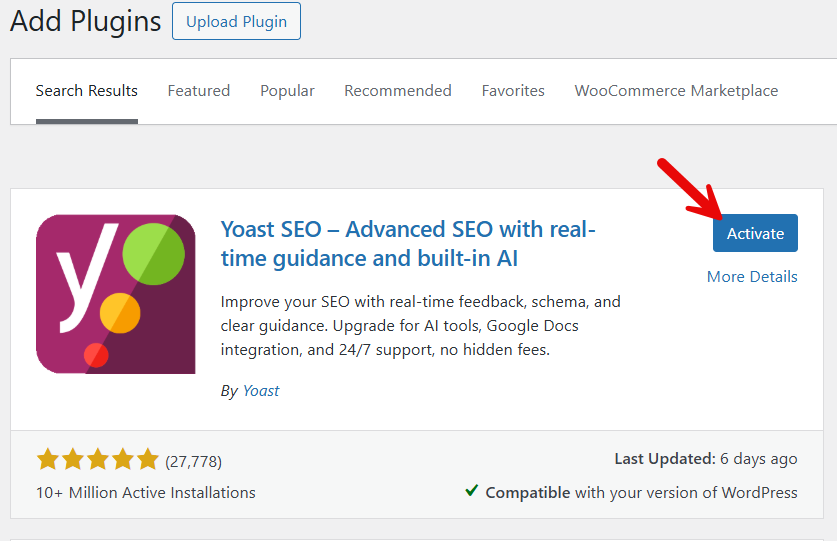
If this is your first time using Yoast, you need to complete an initial configuration. This will only take 2 minutes. Once you are done with the configuration, you can start adding the meta tags and keywords.
To do that, open the blog post or page you need to work on. In the editor, scroll down, and you will see the Yoast settings.

Once you have seen the option, add your primary keyword in the focus keyphrase box.

Based on the keyword you entered, you will get suggestions for the best on-page optimization.
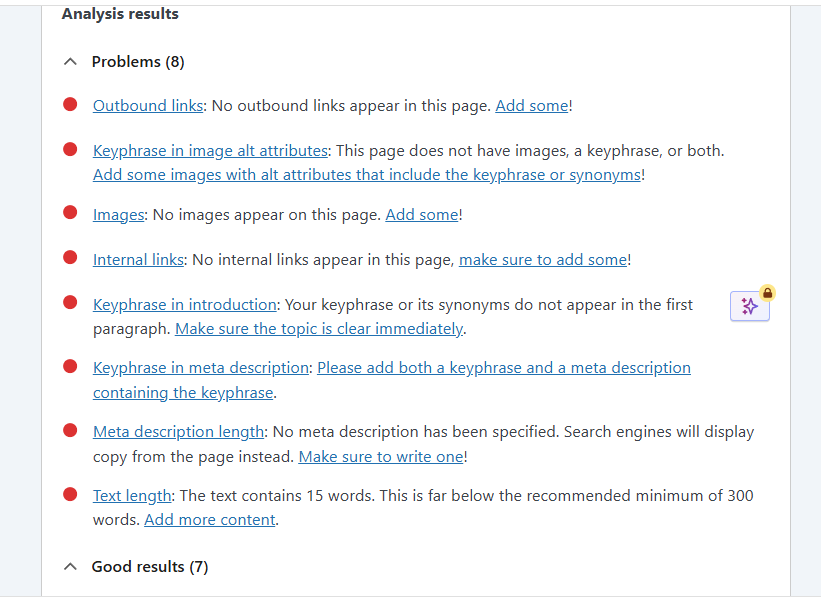
Below the search preview snippet, you can see the option to add an SEO title and meta description.

This way, you can add meta tag and meta description in WordPress. The best thing is that you can edit individual posts and pages according to your needs and add a unique description for each.
So use the plugin as you like.
If you do not need to use an SEO plugin, check the next section.
2. By Editing the Header File
In this method, you won’t be using an SEO plugin. Here, we will be editing the theme files directly.
We recommend using a child theme for this method. So if the parent theme got updated, you will still have the changes saved in the child theme.
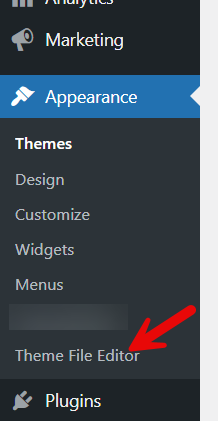
You need to go to the Theme File Editor, which is under Appearance.
From the right-hand side, find the header.php file.
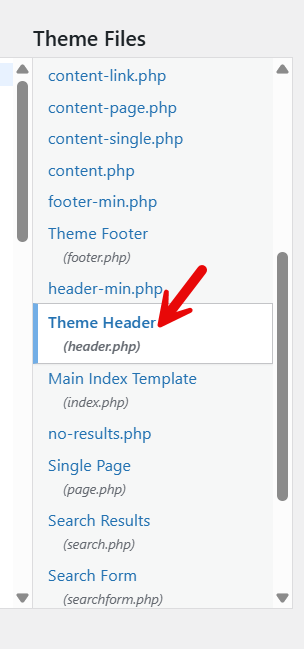
You need to paste the content before </head> tag. The meta tag is:
<meta name="keywords" content="keywords related to the content of the website" />The description will be:
<meta name="description" content="meta description for the content of the website" />You need to tweak these before adding to the header.php file.
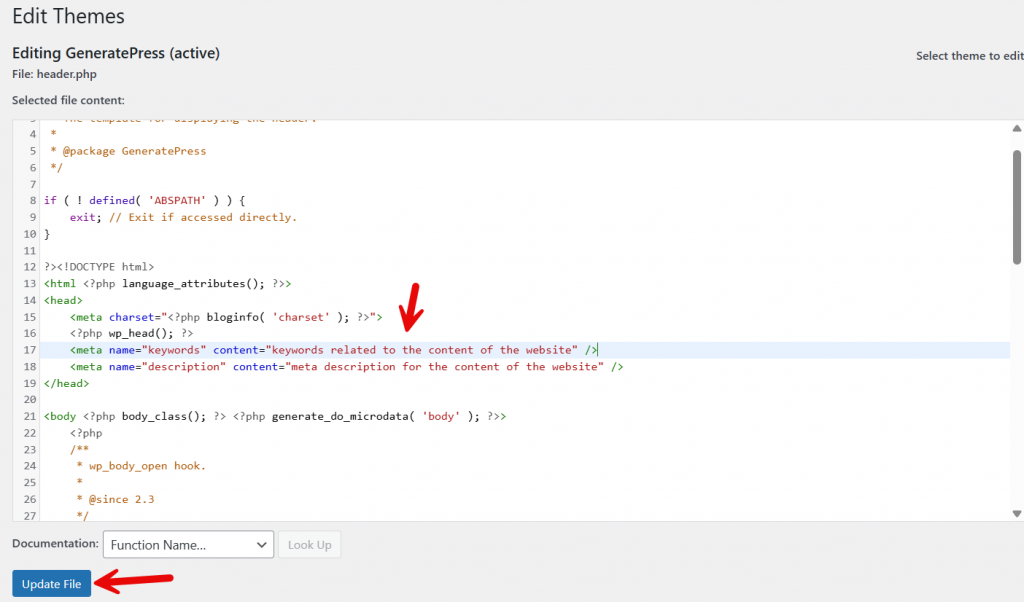
Update the file once you have added these.
That’s it. This is how you can add meta tag and meta description in WordPress manually.
Tips for Writing Perfect Meta Descriptions
A well-crafted meta description helps your WordPress site stand out in the search result and improves engagement.
- Optimize your meta descriptions by including the focus keyphrase or focus keyword that users are searching for
- Always create a unique meta description for every post to avoid duplicate meta issues
- Make sure the description to your WordPress posts sounds natural and the description isn’t stuffed with keywords and meta tags
- Write a meta description that clearly tells users that your page offers the information they need
- Use meta information that matches the content like title so search engines trust the snippet
- Using the Yoast SEO plugin makes it easier to find the Yoast SEO section and see the meta preview
- Important meta tags should help with keywords and meta descriptions that increase the click-through rate
- Check how the title in the search results pairs with your meta description in WordPress for the best visibility
Common Mistakes to Avoid While Doing This
Avoid these common issues to keep your WordPress meta description setup effective and search engine friendly.
- Not creating a unique meta description for every post or page leads to duplicate meta problems
- Forgetting to add meta descriptions at all makes search engines pull default meta text that may not represent your content
- Ignoring the focus keyphrase can reduce the chance of ranking for the right search intent
- Writing overly long descriptions can cause important information to be cut in the search result
- Adding meta keywords expecting SEO improvements since most search engines no longer use them
- Using a WordPress SEO plugin but not checking the snippet preview to see the meta result properly
- Making changes directly to header files without a backup can remove important meta tags if the theme updates
Frequently Asked Questions
Now, we will take a look at some of the frequently asked questions and answers regarding the topic.
How do I add a meta description in WordPress using Yoast SEO?
You can add a meta description to any post or page by opening the content in the WordPress dashboard and scrolling to the Yoast SEO meta box. In the meta description field, start typing in the meta description you want. Yoast SEO will show a preview of how it will appear in the search result.
Where can I find the Yoast SEO meta box in my post or page?
After installing the Yoast SEO plugin, go to a post or page and scroll below the editor. You will see the Yoast SEO section that includes the SEO title and meta description fields along with a place to set your focus keyphrase.
Can I add meta tags to WordPress without a plugin?
Yes, it is possible to add meta tags manually by editing the header.php file in your theme. You can insert meta tags inside the head section to add custom meta information to the WordPress site.
Is editing the header.php file safe for adding meta tags?
It works, but there is some risk. If the theme updates, your changes may be lost. It is recommended to make edits in a child theme or use a code snippets plugin if you want to keep custom meta tags permanent.
Should every page have a unique meta description?
Yes, every page or post should have a unique description that includes relevant keywords. Duplicate descriptions can confuse search engines and reduce the click through rate since users will not see specific information for each page.
Do meta keywords still matter in WordPress SEO?
Meta keyword tags are no longer used by major search engines like Google, so adding them will not improve rankings. Focus more on a compelling meta description and keywords and meta descriptions that make sense for users.
How long should a meta description be for best results?
A well written meta description is usually between 120 and 155 characters. This keeps the snippet readable in search engine results while including your main focus keyphrase and a clear explanation of the content of a page.
Conclusion
Adding a meta description to your WordPress site helps improve your click through rate and gives search engines a clear idea of what your content offers.
If you are using a WordPress SEO plugin like the Yoast SEO plugin, you can quickly find the meta section in any post or page and add the meta description with your focus keyphrase included.
This makes it easier to write a meta description that looks appealing in the search result. You can also add meta tag and meta description in WordPress by editing the header file if you want more control. Just make sure every page has a unique description.
A good WordPress meta description supports your keywords and meta efforts and makes your WordPress website more visible to users searching online.
How else would you like to boost your website’s SEO?
Let us know in the comments.