

Are you looking for the best WordPress Discord plugins for your website? If you are, keep reading this article. Here are the seven best tools to consider.
Building an active online community is easier when your WordPress site connects directly to your Discord server.
With the right WordPress Discord plugins, you can integrate your website with a Discord channel, automate notifications, and keep members engaged in real time. These plugins allow you to connect WordPress posts, WooCommerce updates, forms, and user actions directly to your Discord community without manual work.
From sending updates to a chosen Discord channel to managing roles and members, Discord plugins help bridge the gap between your WordPress site and your Discord account.
In this guide, we’ll explore the best Discord plugins available on WordPress.org that make it simple to integrate, manage, and grow your community efficiently.
Before we go further, let’s look at what WordPress Discord plugins are and why we should use them.
Table of Contents
What Are WordPress Discord Plugins
WordPress Discord plugins enable you to connect and integrate your WordPress site with a Discord server or a specific Discord channel.
These plugins act as a bridge between your website and your Discord community, enabling automated communication and real-time interaction. For example, you can send new post notifications, WooCommerce order updates, form submissions, or user registration alerts directly to Discord.
Most Discord plugins use webhooks or a bot to connect WordPress with your Discord account. Once configured, they can post messages to a chosen Discord channel, assign roles to members, or notify your community when something important happens on your site.
This integration helps website owners manage an active community, keep members informed, and create a more engaging experience without relying only on email or manual updates.
What to Look for In WordPress Discord Plugins
Choosing the right WordPress Discord plugins is essential if you want to connect your website to an active Discord community and manage communication effectively. A reliable plugin should integrate smoothly with WordPress, allow you to send updates to a Discord channel, and help you build engagement without complicated setup.
From basic post notifications to advanced WooCommerce and membership features, the proper integration can turn your Discord server into an extension of your WordPress site.
- Easy integration and setup: The plugin should be simple to install and activate from the WordPress admin, with clear settings, webhook configuration, and app-based connection options.
- Post and content notifications: Look for features that send a post update, comment, or custom post-publish notification directly to a selected Discord channel.
- WooCommerce and membership support: Plugins that integrate with WordPress and WooCommerce can send Discord notifications for WooCommerce events, such as new orders, and integrate with membership tools, including MemberPress.
- Role and user management: Advanced plugins allow you to connect WordPress users to Discord roles, handle user registration events, and support user profile registration.
- Community engagement features: Options such as a live members counter for Discord, a total members count, and direct messages help create a more interactive community.
- Customization and scalability: A good plugin should offer add-ons or a pro version, support multiple Discord servers, and allow custom message formatting as your site grows.
Best 7 WordPress Discord Plugins You Should Try
In a nutshell, the best plugins you can use for the Discord integration are:
- WP Discord Post Plus
- WP Discord Invite
- Notifications on Discord for WooCommerce
- Discord Add-on for Paid Memberships Pro
- WC Sale Discord Notifications
- miniOrange Discord Integration
- Connect LifterLMS to Discord
Below, we will outline what each plugin offers. Based on your requirements or preferences, you can choose an option.
1. WP Discord Post Plus
WP Discord Post Plus is a WordPress plugin that helps you connect your website to a Discord channel and automate updates from your WordPress site to your community.
It allows you to integrate posts, custom post types, and other content so messages are sent directly to the chosen Discord channel when you publish or update content.
This makes it easier to keep your Discord community informed without manual sharing. The plugin is handy for blogs, membership sites, and communities that rely on real-time sharing of new content.
Features
- Send WordPress posts and custom post types to a selected Discord channel
- Automated notifications for new content publication
- Easy webhook setup for quick integration
- Options to customize the message format
- Works with multiple channels if needed
- Simple settings interface in the WordPress admin
Pros
- Automates community updates without manual effort
- Easy to set up for non-technical users
- Helps maintain engagement on your Discord server
Cons
- Limited advanced formatting options in the free version
- Messaging customization features may be basic for complex needs
Pricing
The plugin is available on the WordPress.org repository.
2. WP Discord Invite
WP Discord Invite is a versatile WordPress plugin that simplifies connecting your website visitors with your Discord community.
It allows site owners to generate customizable invite links that can be displayed anywhere on their WordPress site, ensuring that users can join your Discord server seamlessly.
The plugin supports multiple invite configurations, enabling you to control the expiration, usage limits, and permissions for each link. With its lightweight design, it integrates smoothly into any WordPress theme without affecting site performance.
Ideal for building and maintaining an engaged community, WP Discord Invite lets your audience instantly access your Discord server, enhancing communication, engagement, and overall community growth on your website.
Features
- Display a Discord invite button or widget on your site
- Customizable invite message and appearance
- Easy setup through WordPress admin settings
- Options to place the invite via shortcode or widgets
- Works with any Discord server invite link
- Simple interface for non-technical users
Pros
- Makes it effortless for visitors to join your Discord community
- Lightweight and easy to configure
- Works well with pages, posts, and sidebars
Cons
- Focused only on invites (not notifications or message automation)
- Limited advanced display customization without additional code
Pricing
The plugin can be downloaded from the WordPress plugins repository.
3. Notifications on Discord for WooCommerce
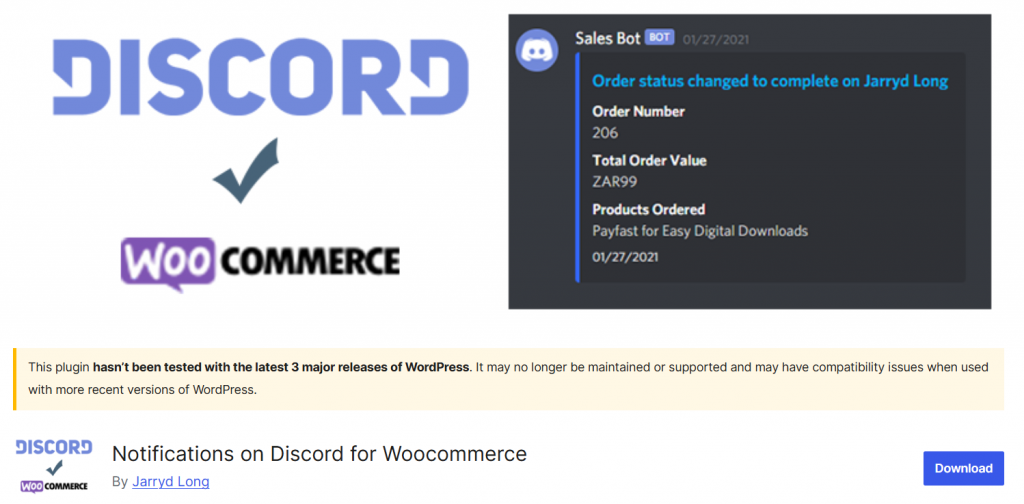
Notifications on Discord for WooCommerce is a WordPress plugin that integrates your WooCommerce store with a Discord channel, keeping your community informed about store activity in real time.
When enabled, this plugin sends notifications from your WooCommerce shop directly to a chosen Discord channel whenever key events occur, such as new orders, completed purchases, or customer updates.
It is beneficial for store owners who run online communities, membership sites, or activity channels where followers want instant updates. With straightforward settings in the WordPress admin, you can connect your WooCommerce site to Discord without complex configurations.
By integrating order and customer alerts with your Discord community, the plugin keeps members engaged, helps support teams stay aware of activity, and creates a seamless flow of communication between your WordPress site and your Discord server.
Features
- Sends WooCommerce notifications to a Discord channel
- Automated alerts for new orders and status changes
- Easy webhook setup through WordPress settings
- Customizable notification messages
- Works with multiple event triggers
- Simple interface for quick setup
Pros
- Keeps your Discord community updated with store activity
- Easy to install and configure
- Helps improve engagement on Discord
Cons
- Focused exclusively on WooCommerce events
- Limited options outside notification customization
Pricing
The free plugin is available in the WordPress.org repository.
4. Discord Add-on for Paid Memberships Pro
Discord Add‑on for Paid Memberships Pro is a WordPress extension that helps you connect your membership site to your Discord community by automatically assigning Discord roles based on membership levels and engaging users in real time.
When integrated, the add‑on synchronizes your WordPress membership data with your Discord server, ensuring members receive the appropriate access and roles in your community without manual steps.
This is especially useful for membership communities, premium groups, online courses, or private channels where you want to reward engagement and manage access seamlessly.
With straightforward settings in the WordPress admin, you can integrate membership roles, keep track of changes, and maintain consistency between your WordPress site and your Discord server. The add‑on improves communication, encourages active participation, and makes your membership ecosystem more interactive.
Features
- Syncs Paid Memberships Pro levels to Discord roles
- Automatic role assignment when members register or upgrade
- Easy setup via plugin settings and Discord bot configuration
- Granular control over role mappings
- Works with multiple membership levels
- Keeps membership status and Discord access aligned
Pros
- Automates role management for community engagement
- Simple integration with membership and Discord systems
- Helps unify your WordPress and Discord communities
Cons
- Requires a membership setup to be useful
- Role mapping may need manual adjustment for complex hierarchies
Pricing
The free version plugin can be downloaded from the WordPress plugins repository. The premium version can be purchased on their official website for $149 per year.
5. WC Sale Discord Notifications

WC Sale Discord Notifications is a WordPress plugin that connects your WooCommerce store to a Discord channel, enabling automatic sharing of sale updates and purchase alerts with your community.
Once configured, this plugin sends notifications to your chosen Discord channel whenever a sale occurs, allowing members to instantly see activity from your WordPress website without checking email or the dashboard.
This is particularly useful for online shops that want to build real‑time excitement around purchases, share customer engagement, and keep a lived‑in feel in their Discord community. With easy setup in the WordPress admin and simple webhook integration, you can have your store instantly sending alerts to your Discord server with minimal configuration.
Features
- Sends WooCommerce sale notifications to a Discord channel
- Automated alerts when purchases are completed
- Easy webhook setup via WordPress settings
- Customizable notification messages
- Supports multiple event types
- No complex configuration required
Pros
- Boosts community engagement with real‑time sale alerts
- Easy to install and activate
- Works well for stores that want social proof in Discord
Cons
- Limited to sale notifications (does not cover other events)
Pricing
WC Sale Discord Notifications is a free WordPress plugin you can download from the repository.
6. miniOrange Discord Integration
miniOrange Discord Integration is a WordPress plugin that connects your WordPress site to your Discord community via secure login and role mapping.
This plugin lets visitors and members use their Discord credentials to log into your WordPress site, enabling seamless community integration and streamlined access control. It also supports synchronizing user roles between Discord and WordPress, helping you manage permissions and access more efficiently.
Whether you run a membership site, an online course platform, or a community hub, this integration makes it easier for users to move between your WordPress site and your Discord server without creating separate accounts, improving convenience and engagement.
Features
- Enable Discord login on your WordPress site
- Map Discord roles to WordPress user roles
- Secure OAuth integration with Discord
- Simple setup via WordPress admin panel
- Works with multiple user roles
- Helps unify login experience across platforms
Pros
- Seamless login using Discord credentials
- Strong role mapping capabilities
- Improves user experience between platforms
Cons
- Some advanced features may require additional configuration
- Role synchronization options may be limited for complex setups
Pricing
It is a free plugin that you can download from the plugins repository.
7. Connect LifterLMS to Discord
Connect LifterLMS to Discord is a WordPress plugin that integrates your WordPress learning platform with your Discord community, helping you keep students and members engaged.
When enabled, this plugin sends activity updates from your LifterLMS courses directly to a selected Discord channel on your server. For example, you can notify your community when someone completes a lesson, passes a quiz, or enrolls in a new course.
This seamless integration helps create a more interactive learning environment by connecting your WordPress site activities with your Discord community in real time.
Features
- Sends LifterLMS activity alerts to a Discord channel
- Notify when students complete lessons or quizzes
- Easy webhook setup through WordPress admin
- Customizable message templates
- Supports multiple event types
- Simple interface for non‑technical users
Pros
- Keeps your learning community informed and engaged
- Easy to set up and configure
- Strengthens the link between WordPress and Discord
Cons
- Limited to LifterLMS notifications and events
- Advanced customization may require additional tweaks
Pricing
The plugin is free and available for download from the WordPress plugins repository.
Frequently Asked Questions
Now, let’s see some of the frequently asked questions and answers regarding the topic.
How do WordPress Discord plugins help build a community?
WordPress Discord plugins let you integrate your website with a Discord channel, making it easier to build a community around your content or services. By incorporating both platforms, you can send updates, invite members to your Discord server, and keep discussions active beyond your website.
Can I connect my WordPress site to a Discord server?
Yes, these plugins are designed to connect your WordPress site to a Discord server. Once the integration is enabled, your website can communicate with Discord to share activity, send messages, and automatically add members to your Discord community.
Do WordPress Discord plugins support notifications?
Most plugins allow sending notifications to Discord for various actions, including WooCommerce events. This helps keep your community informed about new orders, updates, or essential site activity in real time.
Is it possible to integrate Discord without coding?
Yes, integration is usually handled through a simple app-based setup. Developers provide settings where you can register, configure connections, and manage integration without touching code or complex configurations.
Can I control what data is shared between WordPress and Discord?
Good plugins offer attribute mapping, which lets you decide what information is shared between the platform and your Discord channel. This ensures only relevant data is sent and helps maintain privacy and clarity.
Can I remove or disable the Discord connection later?
You can remove or disable the connection at any time from your WordPress dashboard. This gives you complete control if you no longer want to send updates or connect your website to Discord.
Who should use WordPress Discord plugins?
Anyone who wants to send updates, grow their Discord membership, or manage an online community can benefit. These plugins are useful for site owners, developers, and businesses looking to integrate WordPress with Discord to improve engagement.
Conclusion
Using WordPress Discord plugins helps you connect your website to a Discord channel and build an active online community around your brand.
With proper integration, you can link your website to your Discord server, publish post updates, and send messages to users instantly. This makes it easier to keep members informed, share releases, and notify customers about essential updates directly from your WordPress dashboard.
A well-designed plugin should be easy to set up, support app-based login, and allow you to connect your website to your Discord account with minimal configuration. Features such as sending notifications, managing user registration events, and delivering messages to users improve cross-platform communication.
If your goal is to build a community, grow your Discord membership, and streamline interactions between WordPress and Discord, a generic, reliable plugin can streamline the process.
Which plugin will you use?
Let us know in the comments.

